MindFusion Timetable Plugin Review - WordPress Event Schedule Solution
Welcome to this comprehensive MindFusion Timetable Plugin Review! 😊
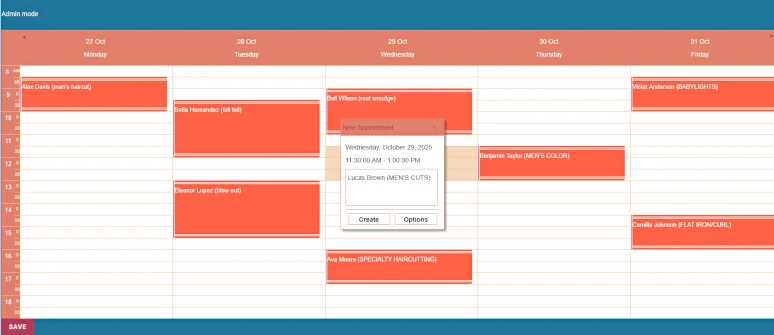
Effortlessly manage and display your schedules on any WordPress page. The MindFusion WordPress Timetable Plugin provides an intuitive and highly customizable solution for any business that runs on a weekly schedule. Whether you're managing a salon, a tutoring center, or a series of events, this plugin makes it easy to keep your clients informed and your business running smoothly.
What truly sets this WordPress timetable plugin apart is its seamless integration with the native WordPress block editor, allowing you to build dynamic schedules while logged in. With support for concurrent events, customizable themes, and the ability to share schedules across multiple pages, this review will show you why it's becoming the go-to solution for service-based businesses.
With both a free version and affordable professional licenses starting at $20 annually, MindFusion offers enterprise-level scheduling without breaking the bank. Let's dive into this thorough review to see if it lives up to the hype!
Key Features Overview
MindFusion WordPress Timetable Plugin provides an interactive timetable for your WP website with these core capabilities:
- Customizable time slot intervals - Set the perfect resolution for your business with 15, 30, or 60-minute time slots
- Flexible vertical & horizontal layouts - Choose between classic vertical view (days as columns) or compact horizontal view (days as rows)
- Seamless WordPress block editor integration - Add and configure timetables directly within any page or post using the native WordPress editor
- Share schedules across multiple pages/posts - Manage a single timetable from one central location and display it across multiple WordPress pages or posts
- Professional styling themes & guest access control - Choose from 10 professional themes with privacy controls to protect sensitive appointment information
These features work together to create a comprehensive scheduling solution that adapts to your specific business needs while maintaining a professional appearance that matches your brand identity.
Popular Use Cases
From fitness classes and workshops to client appointments and team meetings, the WordPress timetable plugin can handle it all. Each use case demonstrates the versatility and adaptability of this powerful scheduling solution.
Medical & Health Services
Display a clear and professional weekly schedule for your practice, allowing patients to easily see doctor availability and booked appointment times. The privacy control features ensure sensitive patient information remains confidential while still providing clear visibility of available slots. Medical practices can manage multiple practitioners' schedules simultaneously and maintain compliance with privacy regulations while offering patients convenient self-service scheduling visibility.
Classes, Courses & Workshops
Organize your class or workshop schedule with color-coded events, making it easy for students to find and register for the right level or topic. Educational institutions can display recurring class schedules, manage instructor availability, and coordinate multiple learning groups simultaneously. The flexible time slot intervals allow different courses to have appropriate durations - from 15-minute tutoring sessions to 2-hour workshops, all displayed clearly within the same timetable interface.
Salons & Personal Services
Manage your salon's daily appointments with a clean and stylish timetable, giving clients a clear view of available slots for various services. Beauty salons, spas, and personal service businesses can display different service types with varying durations, manage multiple practitioners' schedules, and showcase both recurring business hours and one-time appointments. The professional themes ensure the timetable matches your salon's brand aesthetic while maintaining functionality.
Events, Conferences & Excursions
Showcase complex event schedules like music festivals or conferences, with multiple performances across different locations and concurrent time slots. Event organizers can manage multi-track conferences, coordinate speakers across different rooms, and handle simultaneous activities seamlessly. The concurrent events support allows displaying overlapping sessions, helping attendees navigate complex schedules while organizers maintain complete control over venue capacity and resource allocation.
Academic, School & University Schedules
Publish detailed weekly schedules for university classes, exercises, and specific student groups. Educational institutions can display comprehensive weekly schedules including lectures, lab sessions, tutorials, and study groups. The ability to share schedules across multiple pages means departments can display relevant schedules on their own pages while maintaining a single source of truth, ensuring consistency across the entire institution's website.
Resource & Venue Management
Efficiently manage and display the schedule for shared resources, such as lecture halls, meeting rooms, or equipment, including details on usage and users. Businesses and institutions can track facility utilization, prevent booking conflicts, and provide clear visibility of resource availability to authorized users. The customizable event details form allows including specific requirements, user information, and any additional notes needed for proper resource management.
Features Explained
Intuitive Block Editor Integration
Add and configure timetables directly within any page or post using the native WordPress editor. This seamless integration means you don't need separate interfaces or complex shortcodes - everything happens within the familiar WordPress editing environment. The block-based approach provides real-time preview of your schedule changes and ensures compatibility with all modern WordPress themes. Whether you're a WordPress beginner or experienced developer, you'll find the interface intuitive and easy to master.
Flexible Display
Show your schedule in a classic vertical layout with days as columns, or a compact horizontal view with days as rows. The vertical layout resembles traditional calendars with days as columns, making it perfect for detailed daily schedules where visitors need to see multiple time slots per day. The horizontal layout displays days as rows, creating a compact week-at-a-glance view that's ideal for mobile devices or sidebar placements. Both layouts are fully responsive and automatically adapt to different screen sizes, ensuring your timetable looks professional on any device.
Customizable Time Slots
Set your schedule's resolution with 15, 30, or 60-minute intervals to perfectly match your business needs. This flexibility allows different types of appointments and events to be displayed with appropriate granularity. Medical practices might prefer 15-minute slots for patient appointments, while conference venues could use 60-minute slots for session planning. The choice is yours, and you can even mix different time slot requirements within the same schedule while maintaining clarity and readability.
Shared & Centralized Schedules
Manage a single timetable from one central location and effortlessly display it across multiple WordPress pages or posts. This powerful feature eliminates the nightmare of maintaining multiple independent schedules and ensures consistency across your website. Update once, and changes appear everywhere the timetable is displayed. Perfect for businesses with multiple locations, departments with individual pages, or when you need to show the same schedule in different contexts while maintaining a single source of truth.
Concurrent & Overlapping Events
Schedule multiple independent events or appointments within the same time slot and manage concurrent activities, multiple resources, or parallel tracks. Unlike simpler calendar plugins that force single events per time slot, MindFusion understands that real-world scheduling often involves parallel activities. Music venues can book multiple bands simultaneously, universities can schedule parallel classes, and businesses can manage overlapping appointments while maintaining complete visibility and control.
Customizable Event Details
Capture and display comprehensive information for each event or appointment using a customizable details form. Go beyond basic titles and times with rich event information including participant details, location specifications, special requirements, pricing information, and any custom fields your business needs. The built-in assistance forms streamline event creation and management with intuitive interfaces for defining detailed appointment information and recurrence patterns, reducing administrative overhead while improving data completeness.
Event Recurrence & Repetition
Easily schedule repeating events, appointments or work hours with flexible recurrence patterns. From daily work hours to monthly meetings, weekly classes to annual events, the recurrence system handles complex patterns with ease. Specify end dates, set occurrence limits, create exceptions for specific dates, and combine multiple patterns to create sophisticated scheduling scenarios. This feature alone can save hours of administrative time while ensuring consistency in your recurring schedules.
Visual Themes & Customization
Choose from 10 professional themes and customize every visual aspect to perfectly match your WordPress site's design and your needs. Each theme is carefully crafted to provide excellent readability while maintaining professional appearance. Customize colors to match your brand identity, adjust fonts for optimal readability, modify spacing for your layout preferences, and even add custom CSS for complete control. The result is a timetable that looks like it was custom-designed specifically for your website while maintaining all the powerful functionality.
Guest Access & Privacy Control
Guarantee client privacy by hiding sensitive appointment details from public view, allowing guests to see only available or taken time slots. This privacy-conscious approach is invaluable for medical practices, legal services, counseling centers, and any business handling confidential client information. Public visitors see professional availability information without compromising privacy, while logged-in authorized users can view complete details. This dual-access model maintains professionalism while protecting sensitive information.
Getting Started: Installation and Setup
Setting up your first timetable takes only a minute and is as easy as 1, 2, 3. The entire process has been streamlined to get you from download to fully functional timetable in under 5 minutes, even for WordPress beginners.
1. Install
Download the file mindfusion-timetable.zip from this link. In the dashboard of your WP website navigate to the Plugins menu -> Add Plugin and locate the place where you have downloaded mindfusion-timetable.zip. The standard WordPress plugin uploader handles the entire installation process automatically - no FTP access or technical configuration required.
2. Activate
Go to the Installed Plugins sub-menu and activate the plugin. Activation is instantaneous and immediately makes the MindFusion Timetable widget available throughout your WordPress installation. The plugin follows WordPress security and coding standards, ensuring safe and reliable operation on your website.
3. Add the Timetable Widget
Press the "+" sign at the top left corner of the WordPress dashboard to open the WordPress block editor. Navigate to the "Widgets" section, select "MindFusion Timetable" and drop it onto your blog post or page. The block appears instantly in your content editor, ready for configuration. This integration means you can place timetables anywhere on your site - in posts, pages, or even custom post types.
4. Customize Your Schedule
Select the timetable theme, visible days, time intervals, privacy mode, the schedule ID and many other options from the Block properties editor in WordPress. The intuitive interface provides immediate visual feedback as you adjust settings, allowing you to perfect your timetable's appearance and functionality before publishing. Changes are applied in real-time, making the customization process both efficient and enjoyable.
5. Create and Edit Appointments
Publish your post/page and open it in the browser while you are logged in to your WordPress admin account. Select any available timeslot and the New Appointment dialog appears automatically. You can click Options to access advanced customization features for your entry, including custom fields, categorization, and detailed descriptions. Double click on any existing Appointment to edit it - the same familiar dialog interface makes modifications quick and straightforward.
6. Specify Recurrence
Use the Recurrence dialog that is part of the Appointment Editor to create and customize repeating events - work times, open hours, curriculums, regular classes, and any recurring activities. The recurrence system supports complex patterns including daily, weekly, monthly, and yearly repetitions with exceptions and end dates. Set up your entire semester schedule or business hours in minutes rather than hours, and make changes to all instances simultaneously when needed.
Timetable Properties
The MindFusion Timetable Plugin offers comprehensive configuration options that let you tailor every aspect of your schedule to match your specific business requirements and brand identity.
Timetable ID
Share a single event schedule across your entire WordPress site by using the same unique ID on multiple pages. This powerful feature enables centralized schedule management - update once, and changes automatically appear everywhere the timetable is displayed. Perfect for businesses that need consistent scheduling information across multiple pages, departments, or while maintaining different contexts for different visitor segments.
Show/hide appointment details
Control your appointment schedule's privacy by hiding sensitive details from the public, showing only whether a time slot is booked. This privacy control is essential for medical practices, legal services, counseling centers, and any business handling confidential client information. Public visitors see professional availability patterns while logged-in users can access complete appointment details including client names, service types, and any confidential notes.
Built-in Assistance Forms
Streamline event creation and management with intuitive, built-in forms for defining detailed appointment information and recurrence patterns. These assistance forms guide users through the process of creating complex appointments, ensuring no important details are missed while reducing the learning curve. From basic scheduling to complex recurring patterns, the forms provide the right fields at the right time, making schedule management efficient and error-free.
Calendar Type
Define your timetable's purpose by choosing between 'working time' to show general availability or 'appointment' to display a detailed event schedule. The 'working time' type is perfect for displaying business hours, facility availability, or general operating schedules, while the 'appointment' type is designed for detailed booking systems where individual appointments need to be tracked and managed separately.
Different Time Slots
Set the perfect resolution for your weekly schedule with options for 15, 30, or 60-minute time slots. This flexibility ensures your schedule granularity matches your business operations - 15-minute slots for therapy sessions or consultations, 30-minute slots for standard appointments or classes, and 60-minute slots for meetings, facility bookings, or general availability displays.
Customizable Days
Tailor your timetable to your business hours by selecting exactly which days of the week are displayed in your schedule. Businesses operating 5 days a week can hide weekends, while 7-day operations can display full week availability. Seasonal businesses can adjust displayed days as needed, and service-based businesses can create different schedules for different days of operation, all while maintaining clean, focused displays that match actual business hours.
Multiple Themes
Style your WordPress timetable to perfectly match your brand with 10 professional themes and deep customization options. Each theme is professionally designed with optimal color contrast, readable typography, and intuitive visual hierarchy. Customize colors to match your brand palette, adjust fonts for consistency with your website design, modify spacing and borders for layout preferences, and even add custom CSS for complete control over every visual element.
Video Tutorials
Create a Beautiful WordPress Schedule in 5 Minutes
A step-by-step tutorial that shows you how to use the WordPress Timetable plugin to create an eye-catching and responsive class or event schedule in just a few minutes.
Create a Beautiful WordPress Schedule in 5 Minutes A step-by-step tutorial that shows you how to use the WordPress Timetable plugin to create an eye-catching and responsive class or event schedule in just a few minutes.
Free vs Professional
MindFusion believes in providing value upfront. The core MindFusion WordPress TimeTable plugin is free to use and includes all the powerful features needed to get started. The free version allows you to create and manage a schedule with up to 25 events per week and includes a small watermark. This approach lets small businesses, startups, and organizations experience the full power of professional scheduling without any financial commitment, ensuring you can test and implement the solution risk-free.
Free Version Features
- All core scheduling functionality included
- Up to 25 events per week
- 10 professional themes available
- Full block editor integration
- Privacy controls and guest access management
- Shared schedule capabilities
- Recurring event support
- Community support available
- Small watermark displayed
For businesses ready to grow, purchasing a Pro license key unlocks additional capabilities that scale with your success:
Professional License Benefits
- Unlimited events - Remove the 25 events per week limitation and scale your scheduling as your business grows
- No watermark - Clean, professional appearance without any branding that might distract from your content
- Dedicated premium support - Direct access to MindFusion's expert support team for personalized assistance and faster response times
- Free updates - All future updates and new features included at no additional cost
Pricing Options
Choose the licensing model that works best for your business:
Annual Subscription - $20 per year Perfect for businesses that prefer predictable annual expenses with the flexibility to adjust licensing as needs change. Includes all Professional features and support for one year, with the option to renew annually.
Perpetual License - $50 one-time payment Ideal for businesses that prefer a one-time investment with lifetime access to the Professional version. Includes all current features and updates, making it a cost-effective long-term solution.
Both licensing options provide immediate access to Professional features, with secure license key delivery and instant activation. Whether you choose the annual subscription or perpetual license, you're investing in a scheduling solution that grows with your business while maintaining the professional appearance your clients expect.
About MindFusion
For over two decades, MindFusion has been a leader in creating feature-rich, high-performance software components for developers worldwide. Their expertise spans a wide range of tools, from diagramming and charting to scheduling and reporting. They are committed to providing robust, reliable, and well-documented solutions that empower their users to build exceptional applications. The MindFusion TimeTable plugin for WordPress is their latest step in bringing powerful scheduling tools to an even wider audience.
Company Heritage and Expertise
With over two decades of experience in the software components industry, MindFusion has established itself as a trusted provider of professional-grade development tools. Their team specializes in creating components that combine powerful functionality with ease of use, ensuring that both developers and end-users can leverage advanced technology without steep learning curves. This expertise in diagramming, data visualization, and scheduling systems directly informs the sophisticated capabilities found in their WordPress Timetable Plugin.
Commitment to Quality
Every MindFusion product undergoes rigorous testing and quality assurance processes to ensure reliability, performance, and compatibility with the latest technologies. Their WordPress plugins follow WordPress coding standards and security best practices, ensuring safe operation on your website. They maintain comprehensive documentation, responsive customer support, and regular updates to ensure their solutions continue to meet evolving business needs.
Broader Product Ecosystem
The MindFusion TimeTable plugin is part of a comprehensive family of scheduling and diagramming tools that serve diverse development needs. From JavaScript web components to .NET desktop applications, from mobile solutions to WordPress plugins, their ecosystem provides consistent quality and functionality across different platforms. This breadth of experience ensures that their WordPress plugins benefit from lessons learned across thousands of implementations worldwide.
Future Vision
As technology continues to evolve, MindFusion remains committed to innovating and expanding their product offerings. They actively listen to customer feedback and monitor industry trends to ensure their scheduling solutions address real business challenges while anticipating future needs. The WordPress Timetable plugin represents their dedication to making professional scheduling tools accessible to businesses of all sizes, from solo practitioners to large organizations.
Final Review Summary
The MindFusion Timetable Plugin stands out in the crowded WordPress plugin marketplace by delivering professional-grade scheduling capabilities with exceptional ease of use. Its combination of native block editor integration, flexible customization options, privacy-conscious design, and robust feature set makes it an ideal solution for any business that relies on time-based scheduling.
The free version offers remarkable value for smaller operations, while the Professional licensing provides unlimited scalability at competitive price points. With decades of software development expertise behind it and a clear commitment to ongoing improvement, MindFusion Timetable Plugin represents a reliable investment in your website's scheduling infrastructure.
Ready to transform your WordPress scheduling? 👉 Learn More About MindFusion Timetable Plugin and start creating professional schedules today!
Tags
# Review# MindFusion Timetable Plugin# WordPress timetable plugin# Event calendar WordPress# WordPress schedule plugin# Small business scheduling# Clinic appointment WordPress# Salon booking WordPress# WordPress block editor plugin# Recurring events WordPress# WordPress appointment scheduling# Dynamic timetable WordPress# WordPress event management# Professional schedule plugin# WordPress availability calendar# Review# Multi-page schedule sharing# WordPress timetable themes# Guest access control WordPress# Event privacy WordPressManifest Review - Open Source LLM Router for OpenClaw AI Agents
Email Marketing Platform Comparison: Flat-Rate vs. Traditional Pricing Models
Follow for new blogs
Subscribe to our blog
Subscribe to Newsletter
Subscribe to our newsletter to get the best products weekly.