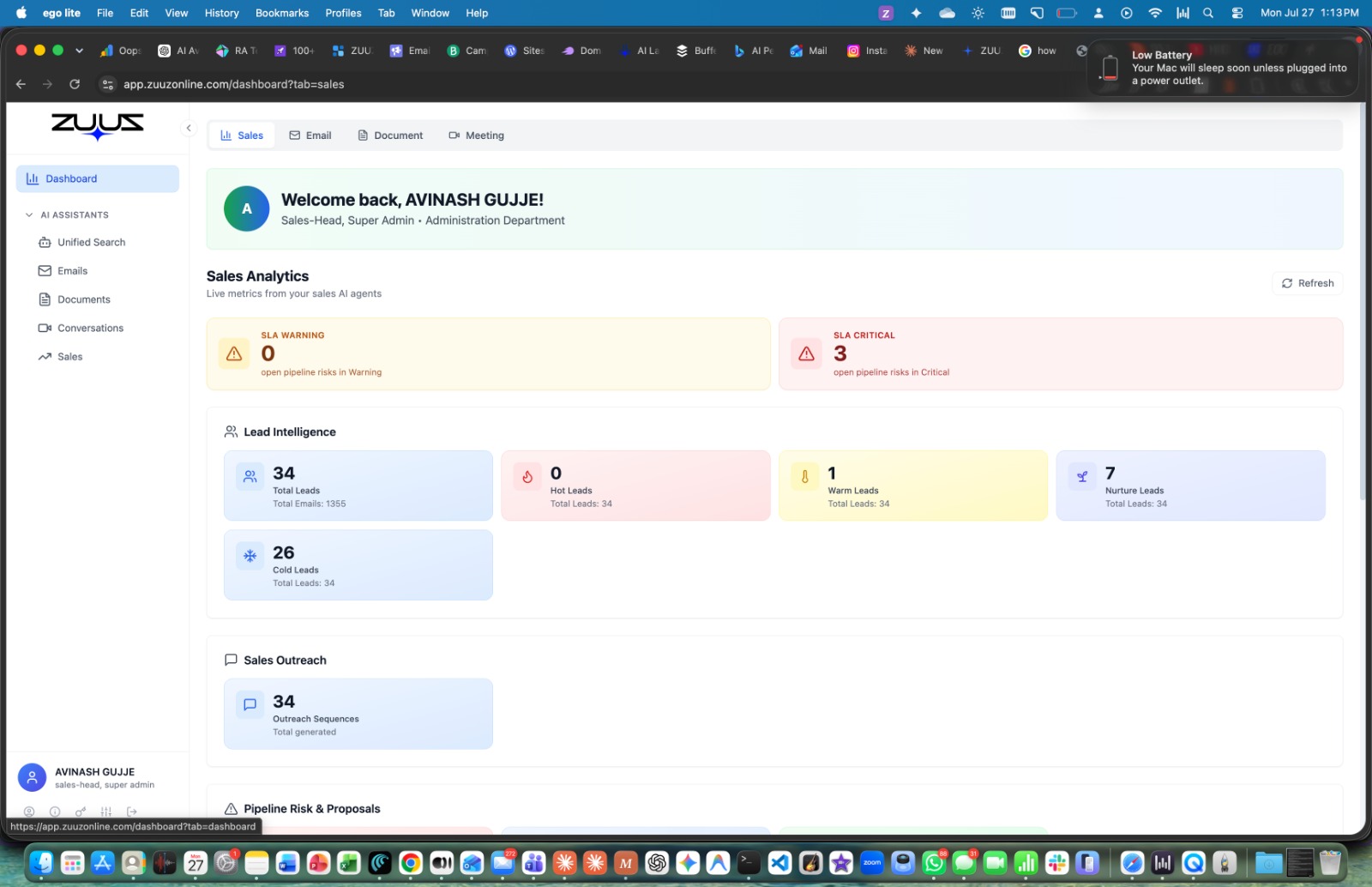
ZUUZ is an innovative AI-powered SaaS platform designed to transform sales inbox management into closed deals. It automatically reads sales emails, qualifies leads, drafts replies, and tracks deals, ensuring no sales opportunity is missed.
Primarily targeting sales teams, founders, and solo sellers within SMBs, ZUUZ is particularly beneficial for industries where deals heavily rely on email communication, such as IT Services, Tech Distribution, Distribution, Insurance, SaaS, and Professional Services.
Key Features:
Automated Lead Capture & Qualification: Reads inbound sales emails, extracts signals (intent, urgency, budget), and qualifies leads as conversations progress.
AI-Powered Reply Drafting: Suggests replies, proposes follow-up sequences, and matches product catalogs against customer requirements for RFPs.
Real-time CRM Integration: Captures pipeline data (quotes, deals, renewals) and writes it directly to Salesforce, HubSpot, or Zoho with an audit trail.
Pipeline Tracking & Visibility: Provides live user metrics on processed emails, documents, and generated sales leads, offering real-time pipeline insights.
Deal Risk Monitoring & Renewal Radar: Monitors deal risks and tracks renewals, providing 90-day or 12-month history depending on the plan.
SKU Matching (for Distribution): Automatically matches customer requirements against product catalogs for bulk orders and prepares quotes.
Use Cases:
ZUUZ excels in scenarios where sales opportunities are often buried in email inboxes. For IT Services firms like RA Technologies, it surfaced $120K in pipeline within 30 days that their CRM had never seen, by capturing leads and active conversations directly from sales mailboxes. This ensures that valuable leads are not lost due to manual oversight.
In distribution, companies like Nesto leverage ZUUZ to streamline bulk order processing. The platform matches customer requirements from inbound emails against thousands of SKUs, prepares quotes efficiently, and tracks every line item through to close, significantly reducing quote turnaround times from days to hours. For Tech Distribution, ZUUZ transformed inbound emails into trackable leads, providing leadership with real-time pipeline visibility where previously CRM was only used for orders.
Pricing Information:
ZUUZ offers a tiered pricing model designed to scale with businesses, starting from Solo ($99/mo) for individual sellers, up to Team-3 ($249/mo), Growth ($349/mo), and Scale ($649/mo) for growing teams. An Enterprise plan is available for custom requirements. All plans include a 30-day free trial with no credit card required, no setup fee, and the ability to cancel anytime. The company emphasizes that one recovered deal typically pays for a full year of ZUUZ.
User Experience and Support:
ZUUZ is designed for rapid deployment, with most teams going live in under a week. It integrates seamlessly with existing CRMs (Salesforce, HubSpot, Zoho) without requiring a "rip-and-replace" approach. The platform ensures human control by proposing actions (reply drafts, CRM updates) that require user approval before execution. Onboarding calls are included with Growth plans and above, and priority support is available for higher tiers.
Technical Details:
ZUUZ connects securely via official Microsoft Graph or Google Workspace OAuth APIs, ensuring user credentials are never stored. It employs an AI classifier to filter emails, processing only sales-related communications (RFPs, renewals, inquiries) while excluding personal, HR, or legal emails. The platform is SOC 2 Type I certified, guaranteeing robust security controls and data privacy.
Pros and Cons:
Pros:
Captures significant "hidden" pipeline from email, improving CRM completeness.
Email-first approach, ideal for industries where deals live in email threads.
SMB-priced and quick to deploy (under two weeks).
Integrates with existing CRMs, avoiding costly migrations.
Maintains human control with mandatory approval for all AI-generated actions.
Strong data privacy and security (SOC 2 Type I certified, OAuth).
Cons:
Primarily focused on email-based sales, less emphasis on call-based interactions (though this is a deliberate design choice).
While easy to deploy, maximizing ROI might require some initial adjustment to the approval workflow.
No explicit free tier beyond the 30-day trial.
Conclusion:
ZUUZ offers a powerful, AI-driven solution to a common sales problem: lost opportunities in overflowing inboxes. By automating lead qualification, reply drafting, and CRM synchronization, it empowers sales teams to capture more pipeline and close more deals without changing their core behavior. Explore ZUUZ's 30-day free trial to uncover the hidden revenue in your sales email today.