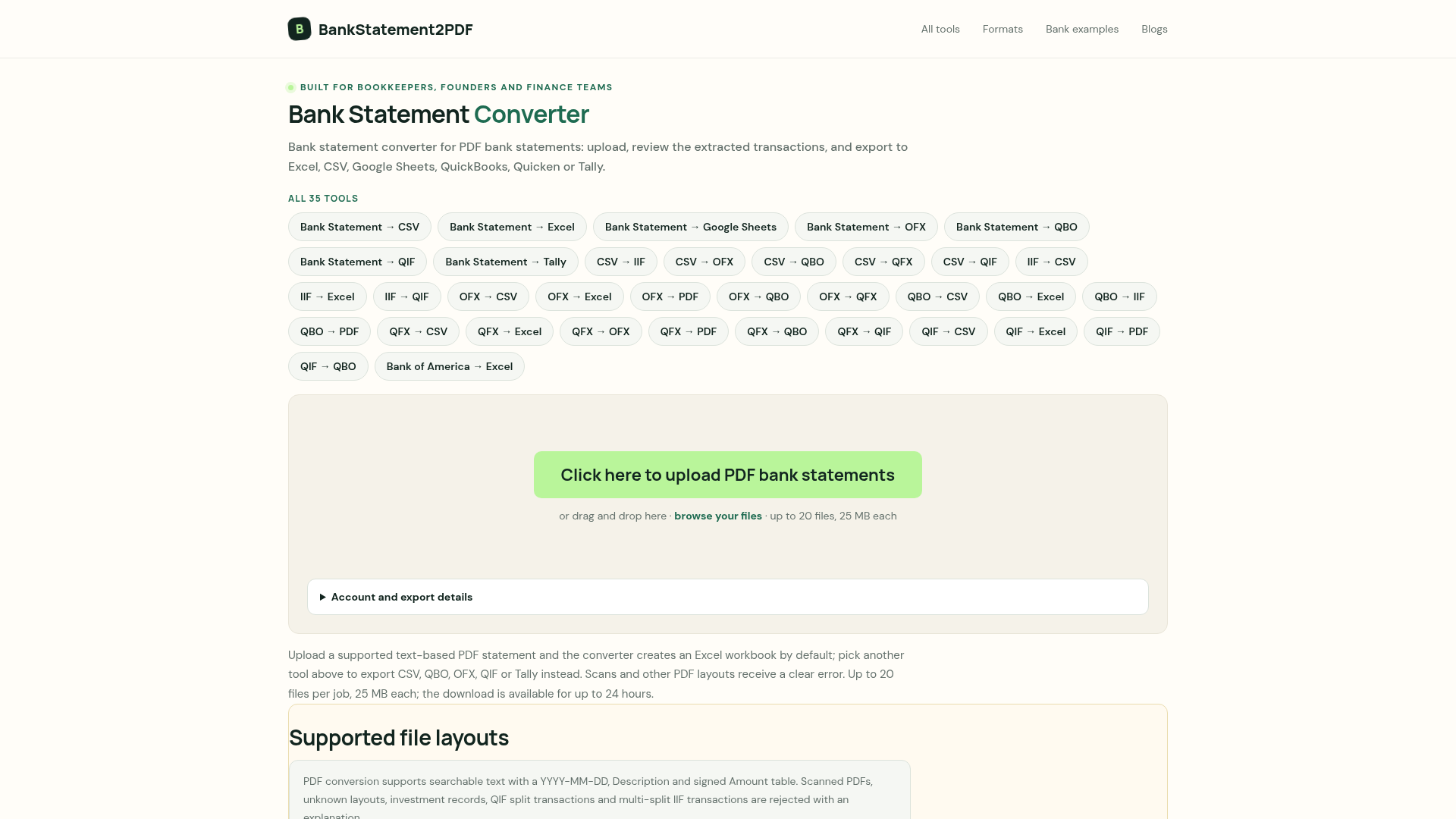
Bank Statement Converter
Bank Statement Converter
This project is scheduled for launch
Launch date: Sunday, December 13, 2026 at 08:00 AM UTC
Scheduled
BBankStatement2PDF offers a robust online bank statement converter designed to transform complex PDF bank statements into easily manageable, structured data formats. It serves as an essential tool for bookkeepers, founders, and finance teams seeking to streamline their financial data processing and reconciliation workflows.
Key Features:
Use Cases:
This SAAS is invaluable for anyone needing to quickly and accurately extract transaction data from bank statements. Bookkeepers can effortlessly import data into their preferred accounting software like QuickBooks, Quicken, or Tally, eliminating manual data entry and reducing errors. Finance teams can leverage the Excel or Google Sheets exports for in-depth analysis, budgeting, and financial reporting, transforming raw PDF data into actionable insights. Founders can simplify their financial record-keeping, ensuring compliance and better oversight of their business finances without needing specialized software installations.
The converter addresses the common problem of unstructured PDF data, which often leads to sorting issues, incorrect data types, and time-consuming manual adjustments. By automating the extraction and formatting, BBankStatement2PDF enables users to feed spreadsheets, accounting imports, or bank feeds with clean, ready-to-use data, significantly improving efficiency and accuracy in financial operations.
Pricing Information:
BBankStatement2PDF operates on a free model, allowing users to create a job, review extracted transactions, and download the converted results without any cost or software installation required.
User Experience and Support:
The platform boasts a straightforward, intuitive workflow: users simply choose their desired output tool, upload their PDF statements, review the extracted transactions and totals, and then export their file. Clear error messages are provided for unsupported file types or layouts, ensuring users understand why a conversion might fail. While specific documentation or tutorials are not explicitly detailed beyond the 'How it works' section, the process is designed to be self-explanatory and efficient.
Technical Details:
The converter specifically supports searchable text-based PDFs with a YYYY-MM-DD, Description, and signed Amount table structure. It employs robust validation to ensure data integrity and security, including SHA-256 checksum recording for uploaded files. The service is entirely web-based, requiring no local software installation.
Pros:
Cons:
Conclusion:
BBankStatement2PDF provides an indispensable, free online solution for converting bank statement PDFs into usable financial data formats. Its focus on accuracy, security, and ease of use makes it an excellent choice for anyone looking to automate their financial data processing. Explore BBankStatement2PDF today to transform your bank statements into actionable data.
Key Features:
- Converts text-based PDF bank statements to Excel, CSV, Google Sheets, QBO, OFX, QIF, and Tally.
- Ensures typed output, preserving data integrity (dates as dates, amounts as numbers).
- Supports batch processing of up to 20 files per job, with each file up to 25 MB.
- Provides a transaction preview and grouped totals for verification before export.
- Strictly validates PDF layouts, rejecting scanned or unknown formats with clear errors.
- Prioritizes security by deleting uploaded files after processing and recording SHA-256 checksums.
Use Cases:
This SAAS is invaluable for anyone needing to quickly and accurately extract transaction data from bank statements. Bookkeepers can effortlessly import data into their preferred accounting software like QuickBooks, Quicken, or Tally, eliminating manual data entry and reducing errors. Finance teams can leverage the Excel or Google Sheets exports for in-depth analysis, budgeting, and financial reporting, transforming raw PDF data into actionable insights. Founders can simplify their financial record-keeping, ensuring compliance and better oversight of their business finances without needing specialized software installations.
The converter addresses the common problem of unstructured PDF data, which often leads to sorting issues, incorrect data types, and time-consuming manual adjustments. By automating the extraction and formatting, BBankStatement2PDF enables users to feed spreadsheets, accounting imports, or bank feeds with clean, ready-to-use data, significantly improving efficiency and accuracy in financial operations.
Pricing Information:
BBankStatement2PDF operates on a free model, allowing users to create a job, review extracted transactions, and download the converted results without any cost or software installation required.
User Experience and Support:
The platform boasts a straightforward, intuitive workflow: users simply choose their desired output tool, upload their PDF statements, review the extracted transactions and totals, and then export their file. Clear error messages are provided for unsupported file types or layouts, ensuring users understand why a conversion might fail. While specific documentation or tutorials are not explicitly detailed beyond the 'How it works' section, the process is designed to be self-explanatory and efficient.
Technical Details:
The converter specifically supports searchable text-based PDFs with a YYYY-MM-DD, Description, and signed Amount table structure. It employs robust validation to ensure data integrity and security, including SHA-256 checksum recording for uploaded files. The service is entirely web-based, requiring no local software installation.
Pros:
- Free to use for core conversion functionalities.
- Supports a wide range of output formats for diverse needs.
- Ensures high data accuracy with typed output.
- Secure file handling with temporary deletion of uploads.
- Efficient batch processing capability.
Cons:
- Does not support scanned or image-only PDF statements.
- Does not infer or reconcile opening/running balances.
- Rejects unknown PDF layouts, limiting flexibility for non-standard statements.
- No direct API or real-time integration with accounting software; relies on file export/import.
Conclusion:
BBankStatement2PDF provides an indispensable, free online solution for converting bank statement PDFs into usable financial data formats. Its focus on accuracy, security, and ease of use makes it an excellent choice for anyone looking to automate their financial data processing. Explore BBankStatement2PDF today to transform your bank statements into actionable data.
Comments
Comments will be available once the project is launched.
Publisher

Launch Date2026-12-13
Platformweb
Pricingfreemium
Tech Stack
#web
Sponsors

Product Hunt Email Scraper
Scraper Email for Product Hunt Daily leaderboard and peerlist, tinylaunch, uneed.
Become a Sponsor
Get your brand featured here
Outbid
View🥇 🥈
🥈 🥉
🥉
Want this spot? Pay what you wantBoost Domain Rating - Boost Domain Rating is a platform to discover and upvote the best tech products. Find top products launching daily.
Boost Domain Rating is a platform to discover and upvote the best tech products. Find top products launching daily.
$35
DirEasy - The Best Directory Boilerplate with AI | DirEasy
The best directory boilerplate, packed with AI, Listings, Payment, Submission, CMS, Blog, Authentication, Newsletter, SEO and more.
$30
Quiz Shot - Solve Any Screenshot Question in Seconds.
AI Study Assistant that answers any screenshot question. Get free AI tutor and step-by-step math and homework help with ChatGPT.
$25