
Pocket Screen
Pocket Screen
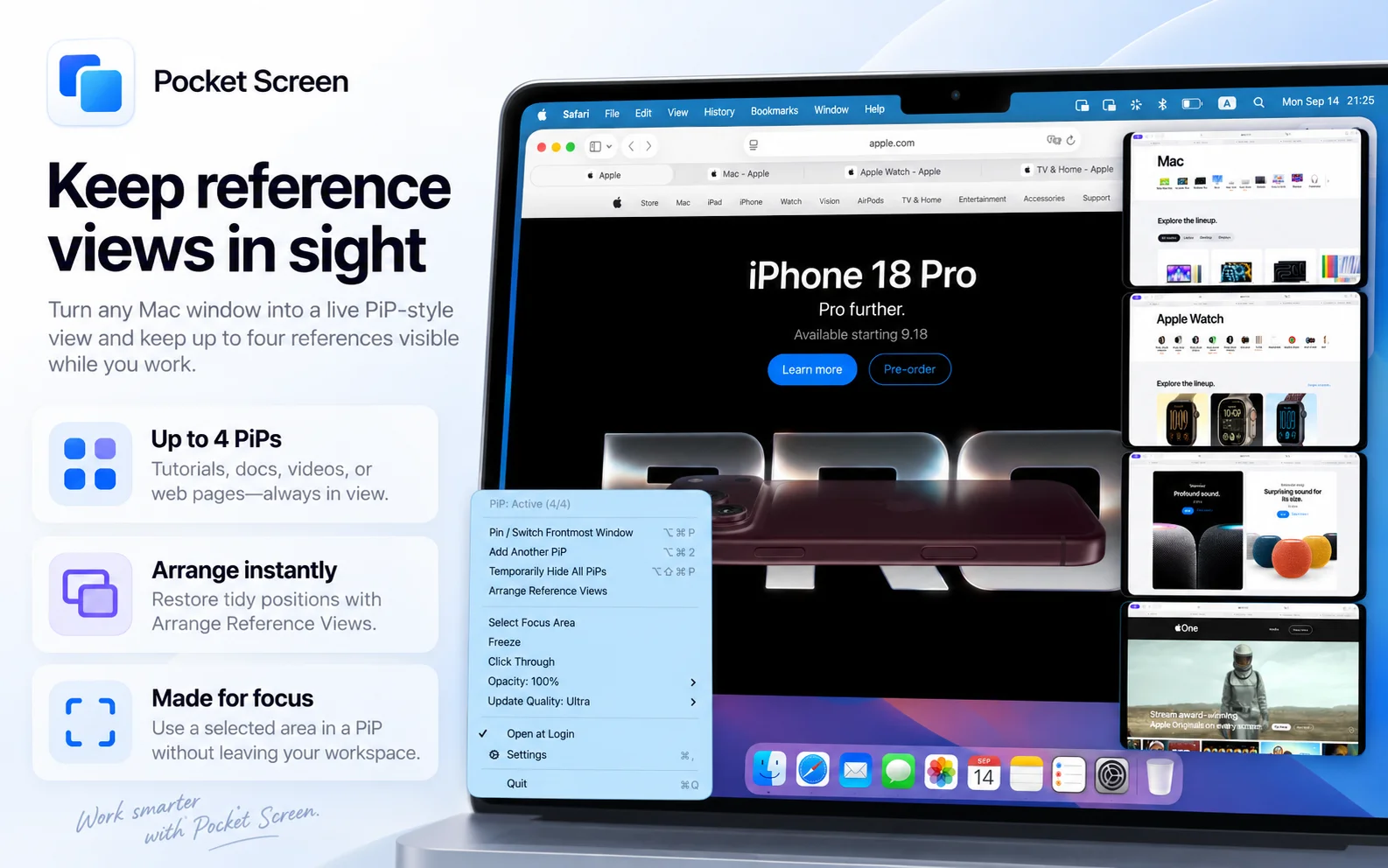
Pocket Screen is a macOS application that turns supported Mac app windows into live, always-on-top Picture-in-Picture reference views. Keep a document, webpage, tutorial, or dashboard visible while working in another app, without moving your original windows.
Pocket Screen 2.0 supports up to four Reference Views with Unlimited, making it useful for anyone working on a MacBook without an external display. Keep the information you need in sight while writing, studying, coding, or checking progress.
Key Features
Multiple Reference Views: Display up to two views with Free or up to four with Unlimited. You can also create multiple views from the same source window.
Focus View: Select the part of a window you want to keep visible instead of displaying the entire window.
Flexible Layout: Move and resize views to fit your workspace, and use Arrange Reference Views to restore their layout.
Freeze and Opacity Controls: Freeze a reference image or adjust its opacity to suit the task.
Click-Through Functionality: Interact with the application behind a Reference View without closing or moving it.
Four Quality Modes: Choose Energy Saver, Standard, or Smooth with Free. Unlimited also unlocks Ultra.
Keyboard Shortcuts: Use the available shortcuts to manage Reference Views and temporarily hide them while you work.
Local Processing: Captured window content stays on your Mac and is not uploaded to developer servers or external AI services.
Flexible Pricing: Start with Free, then choose a one-time purchase or monthly subscription for Unlimited.
Mac Compatibility: Supports macOS 14 or later on both Apple silicon and Intel Macs.
Use Cases
Write a report while referencing a PDF, follow a tutorial while working in another app, or keep documentation visible while coding. Pocket Screen keeps reference material alongside your main task, reducing the need to switch back and forth between windows.
You can also keep a dashboard, timer, task list, or progress window visible while continuing other work. With multiple Reference Views, several sources can remain in sight at once. Use Focus View to show only the relevant area, or freeze a view when you need a stable reference.
Whether you are working in a café, office, library, or on the move, Pocket Screen helps you make practical use of a single MacBook display. It creates reference views of your existing windows rather than adding a separate desktop or external display.
Pricing Information
Pocket Screen operates on a freemium model. The Free Version includes up to two Reference Views, three quality modes, and up to 10 minutes of PiP use per app launch. No account registration is required, and the free option does not expire.
The Unlimited Version removes the time limit, supports up to four Reference Views, and unlocks Ultra quality. It is available as either a one-time purchase or a monthly subscription, with the same Unlimited features in both options.
Current US pricing is $9.99 for the one-time purchase or $2.99 per month. Prices vary by country or region; check your local App Store for current pricing. The one-time purchase does not require a recurring subscription.
User Experience and Support
Create a Reference View from a supported window, then move, resize, or focus it to suit your workflow. Adjust quality and opacity, freeze a view when needed, or enable click-through to work with the application underneath. Available keyboard shortcuts and menu commands provide quick access to view controls.
For setup instructions and troubleshooting, visit the Pocket Screen support page:
https://labs.toybird.com/apps/pocket-screen/support.html
For questions or feedback, contact support@toybird.com.
Technical Details
Pocket Screen is a native macOS application compatible with macOS 14 and later. It supports both Apple silicon and Intel-based Macs.
macOS Screen Recording permission is required to capture other application windows for live previews. Captured window content is processed and rendered locally on your Mac. Pocket Screen does not create screen recording files or upload captured window content to external servers or AI services.
Reference Views are designed for viewing content. To edit a document or interact with an application, use its original window. Capture availability can depend on the source application and macOS; minimized, closed, or protected windows may not display as expected.
Pros and Cons
Pros:
Keeps reference material visible while you work in another app.
Supports up to four Reference Views with Unlimited.
Includes selected-area viewing, freeze, opacity, and click-through controls.
Offers quality modes for different viewing needs.
Processes captured window content locally, with no account required.
Provides an ongoing free option and a choice of one-time or monthly purchase.
Cons:
Available for macOS only, with no Windows or Linux version.
Free use is limited to 10 minutes per app launch, two views, and three quality modes.
Reference Views are for viewing; interaction takes place in the original application.
Some source windows may be unavailable for capture because of application or macOS restrictions.
Conclusion
Pocket Screen helps you keep useful information visible without giving up your main workspace. From a single PDF reference to several live views, it offers a practical way to work with multiple sources on one Mac display. Start with the free version, then choose Unlimited if you need longer sessions, up to four Reference Views, or Ultra quality.
Comments
Achievement


Publisher

Launch Date2026-10-16
Platformdesktop
Pricingfreemium
Tech Stack
#Swift#SwiftUI#AppKit#ScreenCaptureKit#StoreKit
Sponsors

Product Hunt Email Scraper
Scraper Email for Product Hunt Daily leaderboard and peerlist, tinylaunch, uneed.
Become a Sponsor
Get your brand featured here
Outbid
View🥇 🥈
 🥉

Want this spot? Pay what you wantBest Launch Directories: launch directories with DR, traffic and pricing
Launch directories, product launch platforms and startup listing sites in one table, with Domain Rating by Ahrefs, traffic where known, pricing and link type for each.
$50
Boost Your Domain Rating — DoFollow Backlinks (DR 30–70) from $30
Raise your Ahrefs Domain Rating with 5 - 50 dofollow backlinks from DR 30–60 sites — from $50, guaranteed to improve your DR or your money back.
$45
DirEasy - The Best Directory Boilerplate with AI | DirEasy
The best directory boilerplate, packed with AI, Listings, Payment, Submission, CMS, Blog, Authentication, Newsletter, SEO and more.
$41