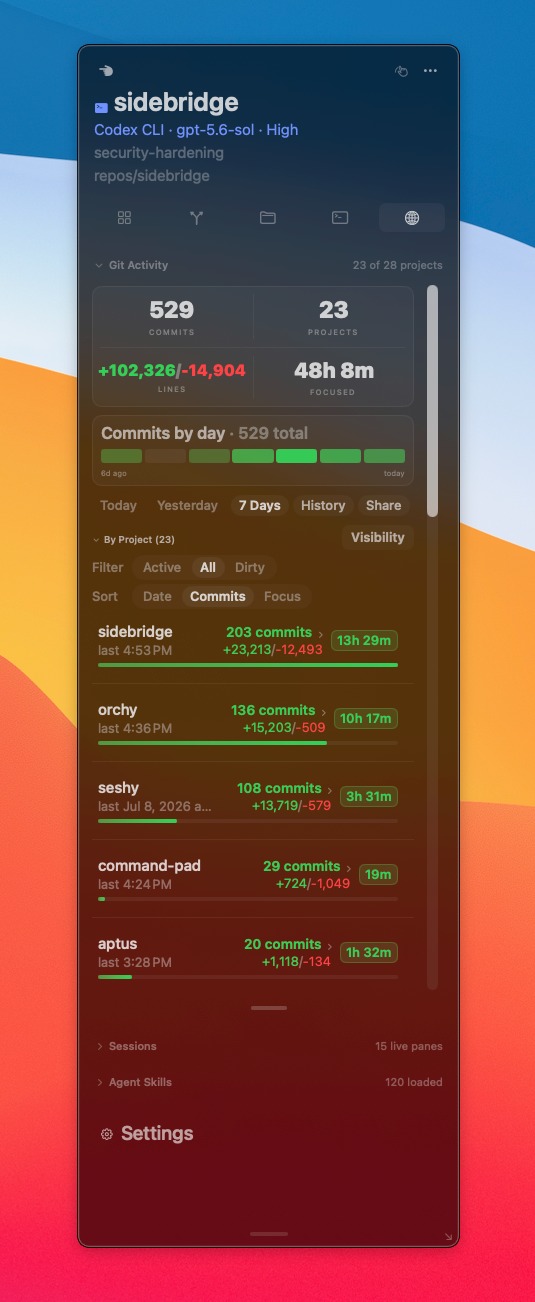
Sidebridge is a native macOS Swift application designed to provide "peripheral vision" for developers working in terminals and with AI agents. It seamlessly integrates crucial project context – such as Git status, diffs, file trees, and agent activity – directly into a floating sidebar that follows your active terminal pane or desktop window, eliminating the need to constantly switch to an IDE. This tool is ideal for developers who prefer a command-line workflow and leverage AI coding assistants like Codex CLI and Claude Code.
Sidebridge addresses the challenge of fragmented project awareness in modern terminal-heavy, multi-agent development environments. It automatically switches context as you move between panes, tabs, and agent chats, ensuring you always have relevant information about the active project, branch, and worktree. Key features include real-time Git status, a "Since Last Focus" summary to quickly catch up on changes, a dedicated agent surface displaying tool calls, goals, and configurations, and a customizable sidebar layout. It also offers a lightweight built-in viewer for quick glances at diffs, READMEs, and various config files.
For enhanced capabilities, Sidebridge offers a Pro version. The free tier provides the active, focus-aware sidebar with today's cross-repo activity and essential Git and agent insights. Upgrading to Pro unlocks durable work history, project-context search across files, commits, and agent notes, deeper project activity beyond today, export options for standups, a writable Agent Brief for structured agent memory, and a Compiler API for agents to query structured project data.
Sidebridge operates on a freemium model. The core active sidebar features are available for free forever, requiring no account or trial. The Pro version, which includes retained history, advanced search, and deeper agent integration, is available as a one-time purchase of $15, upgradeable directly within the app.
The user experience is designed for minimal disruption, with a native macOS interface that can be kept visible, tucked to a tab, or hidden when not in use. It integrates with popular terminal emulators like tmux, Ghostty, iTerm2, Warp, Alacritty, and WezTerm, as well as Codex and Claude Code desktop apps. Sidebridge also offers 30+ themes to match your terminal's palette, ensuring a cohesive visual experience. Documentation is available to guide users on its features and scope.
Built as a native macOS Swift app, Sidebridge ensures high performance and tight integration with the operating system. It reads local repositories, sessions, and retains history on your machine, providing a local-only, structured JSON Compiler API for agents to query project state.
Pros:
Sidebridge addresses the challenge of fragmented project awareness in modern terminal-heavy, multi-agent development environments. It automatically switches context as you move between panes, tabs, and agent chats, ensuring you always have relevant information about the active project, branch, and worktree. Key features include real-time Git status, a "Since Last Focus" summary to quickly catch up on changes, a dedicated agent surface displaying tool calls, goals, and configurations, and a customizable sidebar layout. It also offers a lightweight built-in viewer for quick glances at diffs, READMEs, and various config files.
For enhanced capabilities, Sidebridge offers a Pro version. The free tier provides the active, focus-aware sidebar with today's cross-repo activity and essential Git and agent insights. Upgrading to Pro unlocks durable work history, project-context search across files, commits, and agent notes, deeper project activity beyond today, export options for standups, a writable Agent Brief for structured agent memory, and a Compiler API for agents to query structured project data.
Sidebridge operates on a freemium model. The core active sidebar features are available for free forever, requiring no account or trial. The Pro version, which includes retained history, advanced search, and deeper agent integration, is available as a one-time purchase of $15, upgradeable directly within the app.
The user experience is designed for minimal disruption, with a native macOS interface that can be kept visible, tucked to a tab, or hidden when not in use. It integrates with popular terminal emulators like tmux, Ghostty, iTerm2, Warp, Alacritty, and WezTerm, as well as Codex and Claude Code desktop apps. Sidebridge also offers 30+ themes to match your terminal's palette, ensuring a cohesive visual experience. Documentation is available to guide users on its features and scope.
Built as a native macOS Swift app, Sidebridge ensures high performance and tight integration with the operating system. It reads local repositories, sessions, and retains history on your machine, providing a local-only, structured JSON Compiler API for agents to query project state.
Pros:
- Seamless, automatic context switching across terminal panes and agent apps.
- Significantly reduces context switching and "catch-up tax" for developers.
- Deep integration with Git, AI agents (Codex, Claude Code), and various terminal setups.
- Provides comprehensive, real-time project awareness in a non-intrusive sidebar.
- Highly customizable layout and themeable to match user preferences.
- Native macOS performance and aesthetic.
- Freemium model allows users to try core features without commitment.
- Exclusively available for macOS users.
- Advanced features like retained history and agent API require the Pro upgrade.
- May require some initial setup for tmux hooks or app tracking.
Comments
Publisher

Launch Date2026-10-12
Platformdesktop
Pricingfreemium
Tech Stack
#Swift#macOS#tmux
Sponsors

Product Hunt Email Scraper
Scraper Email for Product Hunt Daily leaderboard and peerlist, tinylaunch, uneed.
Become a Sponsor
Get your brand featured here
Outbid
View🥇 🥈
🥈 🥉
🥉
Want this spot? Pay what you wantBest Launch Directories: launch directories with DR, traffic and pricing
Launch directories, product launch platforms and startup listing sites in one table, with Domain Rating by Ahrefs, traffic where known, pricing and link type for each.
$50
Boost Your Domain Rating — DoFollow Backlinks (DR 30–70) from $30
Raise your Ahrefs Domain Rating with 5 - 50 dofollow backlinks from DR 30–60 sites — from $50, guaranteed to improve your DR or your money back.
$45
DirEasy - The Best Directory Boilerplate with AI | DirEasy
The best directory boilerplate, packed with AI, Listings, Payment, Submission, CMS, Blog, Authentication, Newsletter, SEO and more.
$41