This project is scheduled for launch
Launch date: Wednesday, November 18, 2026 at 08:00 AM UTC
Scheduled
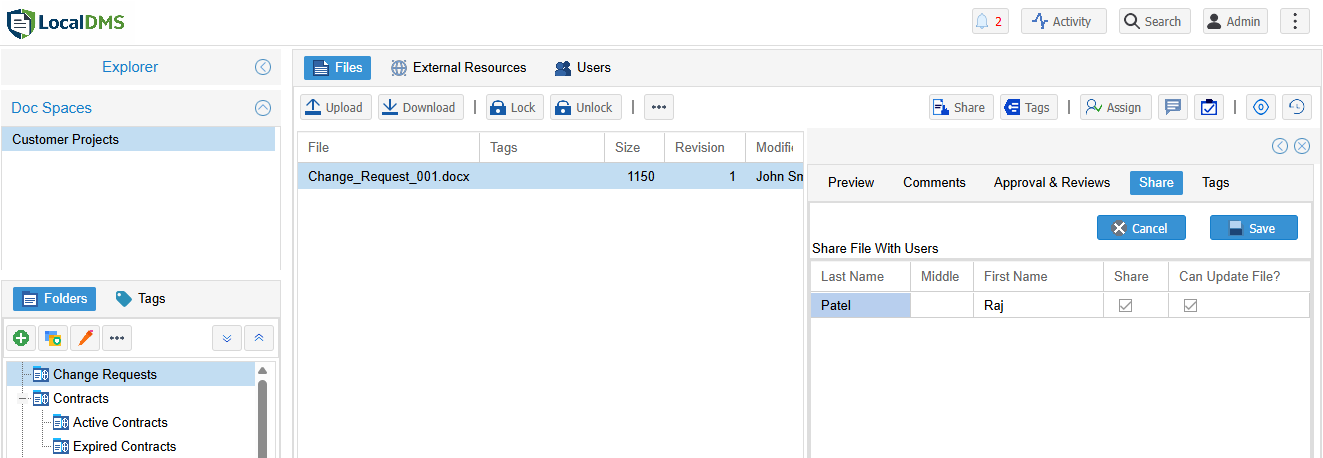
LocalDMS is a robust, browser-based document management system designed to provide enterprise-grade features for teams of all sizes. It ensures secure storage, instant searchability, and comprehensive control over all your digital files, whether deployed on-premises or in a hosted SaaS environment. This solution is ideal for small teams leveraging the free Community Edition, as well as larger organizations prioritizing data privacy, compliance, and cost-effective document management.
Key Features
- Instant full-text search with built-in OCR for scanned PDFs and images, supporting multiple languages.
- Automatic version tracking and immutable compliance audit trails for every document revision.
- Granular role permissions, secure collaboration tools, and streamlined external file sharing.
- Flexible hybrid deployment options, including 100% on-premises on Windows servers for data sovereignty or a fully managed SaaS environment.
- In-app task assignments and document comments to enhance daily workflows.
- Free-forever Community Edition for up to 10 users, with no credit card or expiration.
Use Cases
LocalDMS addresses the critical need for organized, secure, and accessible document workflows. For businesses struggling with scattered files and inefficient processes, it centralizes all documents, making them searchable and manageable from a single screen. This improves productivity by allowing users to browse folders, preview files instantly, and manage tags, approvals, and sharing effortlessly. The platform is particularly beneficial for organizations with strict compliance requirements. Its automatic version tracking, immutable audit trails, and granular permissions ensure that every document change is recorded and controlled, meeting regulatory standards. Furthermore, the option for 100% on-premises deployment provides absolute data privacy and sovereignty, a crucial advantage for industries handling sensitive information. For modern teams, LocalDMS facilitates seamless collaboration, whether in the office or working remotely. Features like in-app task assignments, document comments, and secure external sharing streamline communication and ensure that team members and clients can interact with documents efficiently and securely.Pricing Information
LocalDMS offers a compelling pricing model, starting with a "free-forever" Community Edition for up to 10 users, which requires no credit card, has no trial expiration, and no recurring fees. For larger teams, on-premises perpetual licenses are available, starting at $750 for up to 20 users, $3,000 for 50 users, and $5,000 for 100 users. These perpetual licenses mean a one-time purchase with no annual renewal fees, offering significant long-term cost savings compared to typical SaaS subscriptions. Pricing for the hosted SaaS environment is available upon contact.User Experience and Support
Designed to be "Affordable. Powerful. Simple.", LocalDMS provides a user-friendly, browser-based interface that works intuitively. The Community Edition boasts a "1-Click Installation" for quick setup on a Windows PC or server. While specific support channels aren't detailed, the platform encourages users to "Contact us" for more questions and assistance with evaluation, implying direct support availability.Technical Details
LocalDMS is primarily designed for on-premises deployment on local Windows servers, giving users complete control over their data, security, and infrastructure. It operates as a browser-based application, ensuring accessibility from various devices. A key technical feature is its built-in OCR (Optical Character Recognition) service, which automatically extracts text from scanned PDFs and images, adding it to the full-text search index for enhanced discoverability.Pros and Cons
- Pros:
- Generous free-forever Community Edition for small teams.
- Cost-effective perpetual licenses with no recurring fees for on-premises deployments.
- Strong emphasis on data privacy and sovereignty with 100% on-premises option.
- Comprehensive enterprise-grade features including version control, audit trails, and OCR.
- Flexible hybrid deployment model (on-premises or SaaS).
- Cons:
- Primary deployment model is Windows server-based, which might not suit all IT environments.
- Specific pricing for the hosted SaaS option is not publicly detailed.
- No explicit mention of dedicated mobile applications, though browser-based access is implied.
Conclusion
LocalDMS stands out as a powerful and affordable document management solution, offering enterprise-level features like version control, audit trails, and advanced search capabilities without the high recurring costs of many competitors. Its flexible deployment options cater to diverse needs, from small teams seeking a free solution to larger enterprises prioritizing data control. We encourage you to download the free Community Edition or schedule a demo to experience its full potential.Comments
Comments will be available once the project is launched.
Publisher

Launch Date2026-11-18
Platformweb
Pricingfreemium
Tech Stack
#web#Windows
Sponsors

Product Hunt Email Scraper
Scraper Email for Product Hunt Daily leaderboard and peerlist, tinylaunch, uneed.
Become a Sponsor
Get your brand featured here
Outbid
View🥇 🥈
 🥉

Want this spot? Pay what you wantBest Launch Directories: launch directories with DR, traffic and pricing
Launch directories, product launch platforms and startup listing sites in one table, with Domain Rating by Ahrefs, traffic where known, pricing and link type for each.
$50
Boost Your Domain Rating — DoFollow Backlinks (DR 30–70) from $30
Raise your Ahrefs Domain Rating with 5 - 50 dofollow backlinks from DR 30–60 sites — from $50, guaranteed to improve your DR or your money back.
$45
DirEasy - The Best Directory Boilerplate with AI | DirEasy
The best directory boilerplate, packed with AI, Listings, Payment, Submission, CMS, Blog, Authentication, Newsletter, SEO and more.
$41