
Introduction
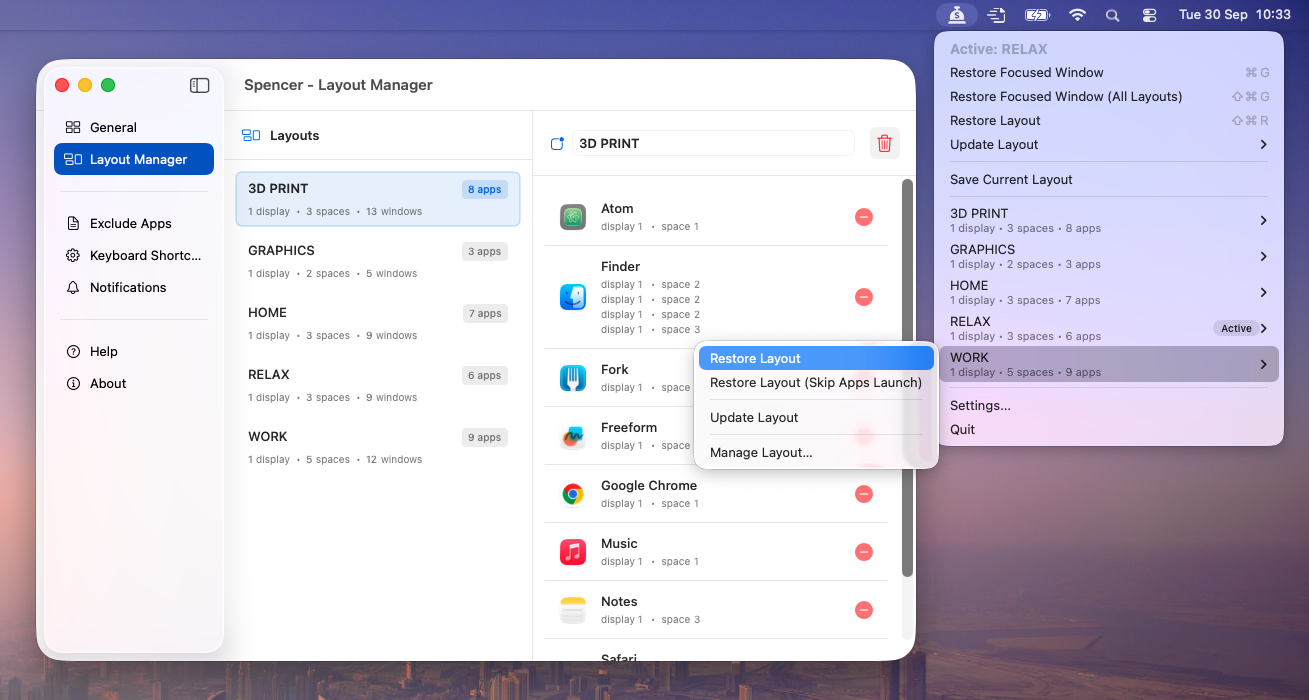
Spencer is a powerful macOS window manager designed to revolutionize how users manage their digital workspace. It enables effortless saving and restoration of entire window layouts and application configurations across multiple virtual desktops (Spaces) and diverse display setups.Target Audience
Ideal for Mac users, from professionals to creatives, who aim to enhance productivity, maintain focus, and seamlessly transition between different tasks without the distraction of manual window arrangement.Key Features
- One-click save and restore of complex window layouts.
- Comprehensive support for macOS Spaces, including adding/removing specific spaces.
- Seamless adaptation to various multi-display configurations (single, dual, ultrawide).
- Intelligent app management: launches necessary apps and hides inactive ones.
- Precise window resizing and free arrangement (not a snapping tool).
- Profile creation for distinct workflows (e.g., Work, Meetings, Relax).
Use Cases
Spencer excels in scenarios where context switching is frequent and efficient workspace management is crucial. For professionals, it allows instant transitions between a "Work" profile, organizing all project-related applications and documents, and a "Meetings" profile, presenting a clean desktop to avoid accidental sharing of sensitive information. This eliminates the time-consuming process of manually opening, closing, and rearranging windows. Furthermore, users with dynamic display setups, such as those who switch between a laptop screen, an external monitor at work, and an ultrawide display at home, will find Spencer invaluable. It automatically adjusts window positions and sizes to match the current display configuration, ensuring a consistent and productive environment regardless of the hardware.Pricing Information
Spencer is available for a one-time purchase of $19.99. It comes with a 14-day money-back guarantee, allowing users to try it risk-free. While there isn't a free trial, interested users can subscribe to the newsletter for updates and exclusive offers.User Experience and Support
Spencer is praised for its simplicity and reliability, offering a "one-click" solution for saving and restoring layouts. User testimonials highlight its ease of use and significant time-saving benefits. Support for refunds and license transfers is handled via email.Technical Details
Spencer is an Apple-notarized application, ensuring safety and trust, and requires macOS 13 Ventura or later. It is fully compatible with popular window managers like Moom, Rectangle, and Magnet. Current limitations include a maximum of 16 spaces, lack of Stage Manager support, and simulated (not native) fullscreen window behavior. It cannot open new browser tabs or individual files, but intelligently manages existing windows.Pros
- Significantly boosts productivity by automating window management.
- Exceptional integration with macOS Spaces and multi-display setups.
- Profile-based workflows enhance focus and reduce distractions.
- Preserves work progress by hiding rather than closing apps.
- Backed by a 14-day money-back guarantee.
Cons
- Limited to 16 spaces across all displays.
- Does not support macOS Stage Manager.
- Fullscreen windows are simulated, not native.
- Cannot restore specific browser tabs or individual files.
- Not yet compatible with Yabai or Aerospace window managers.
Conclusion
Spencer stands out as an indispensable tool for macOS users seeking unparalleled control over their digital workspace. Its ability to save and restore complex window layouts and app configurations across various contexts and displays makes it a powerful ally for productivity. Discover Spencer today to streamline your workflow and optimize your Mac experience.Comments
Achievement


Publisher

Launch Date2025-12-21
Platformdesktop
Pricingpaid
Tech Stack
#macOS
Sponsors

Product Hunt Email Scraper
Scraper Email for Product Hunt Daily leaderboard and peerlist, tinylaunch, uneed.
Become a Sponsor
Get your brand featured here
Outbid
View🥇 🥈
🥈 🥉
🥉
Want this spot? Pay what you wantBoost Domain Rating - Boost Domain Rating is a platform to discover and upvote the best tech products. Find top products launching daily.
Boost Domain Rating is a platform to discover and upvote the best tech products. Find top products launching daily.
$35
DirEasy - The Best Directory Boilerplate with AI | DirEasy
The best directory boilerplate, packed with AI, Listings, Payment, Submission, CMS, Blog, Authentication, Newsletter, SEO and more.
$30
Quiz Shot - Solve Any Screenshot Question in Seconds.
AI Study Assistant that answers any screenshot question. Get free AI tutor and step-by-step math and homework help with ChatGPT.
$25