Categories
Internet of Things (IoT)
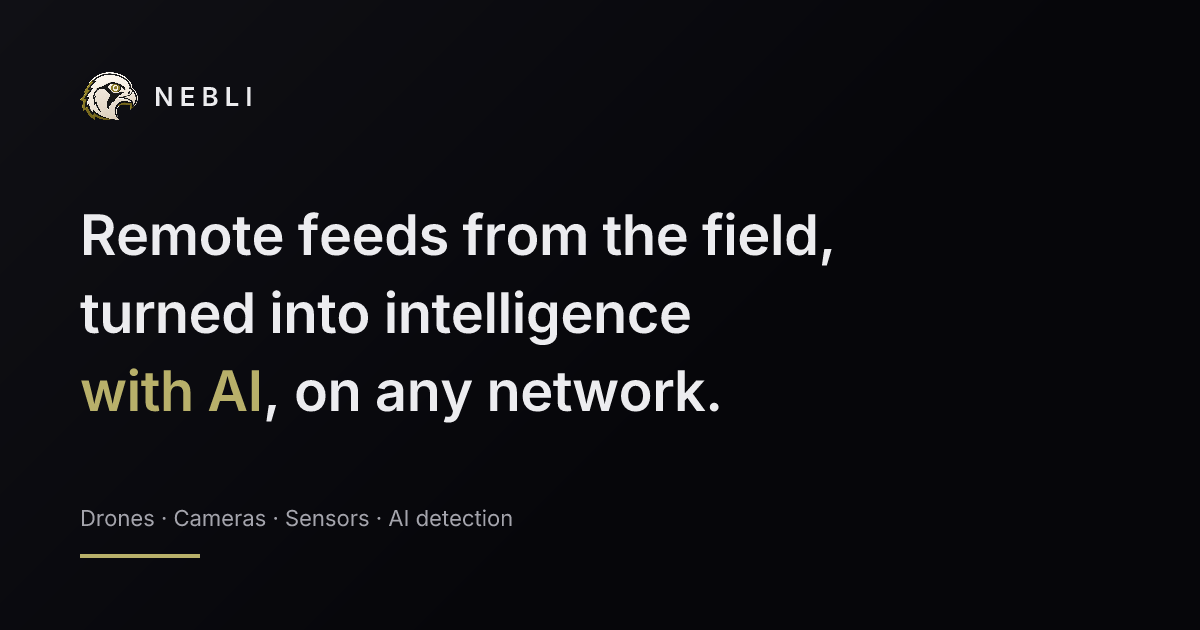
Live Intelligence from the FieldNEBLI is a SaaS platform designed to provide secure, real-time live streaming and cloud recording for drone operations. It enables operators to share live drone feeds with remote teams instantly, ensuring critical field intelligence is accessible when and where it's needed most.Targeting both solo drone operators and large enterprises, NEBLI streamlines communication and data management for diverse operational needs.Key Features:PIN-Gated Live Streaming: Secure, private access to live drone feeds from any browser, accessible over LTE, Starlink, or existing connections.Resilient Connectivity: Features sequence-aware retransmit on both legs and a 75-millisecond reorder window to ensure stable feeds even with cellular jitter and network dropouts.Dual Recording: Every flight records to the cloud with a year of retention (customizable for enterprise) and simultaneously field-side to your own SD card.AI-Powered Detection: Arm plain English rules on your feeds for real-time frame evaluation, allowing operators to focus on flying without complex model training or labeling.Robust Integration: Offers a REST API with scoped keys, signed webhooks with delivery logs, and an MCP server for seamless integration with existing command centers and systems.Scalable for Enterprise: Supports unlimited viewers with no per-viewer billing and no per-drone licensing, making it ideal for coordinating large-scale operations across multiple sites.Use Cases:For Solo Operators: Imagine being an hour out in a field, flying your drone, while your remote team needs updates. NEBLI DRONES allows you to share a private, PIN-gated link, enabling them to watch the flight live in any browser. This eliminates the need for complex production setups, ensuring immediate visibility and facilitating same-day footage handover.For Enterprise Operations: Manage crews across various sites and networks with ease. NEBLI DRONES consolidates all your drone feeds onto one live map, providing per-site access and a unified view for your control room. Its robust API and integration capabilities ensure that live intelligence lands directly in your existing systems, transforming improvised workflows into a coordinated, efficient operation.Pricing Information:NEBLI operates on a freemium model, offering a free tier to get started without a sales call. Enterprise solutions with custom retention and advanced integration require a consultation to tailor the service to specific operational setups.User Experience and Support:The platform is designed for ease of use, allowing users to create an account, connect their drone, and bring up their first live feed quickly. Comprehensive documentation, including a roadmap, changelog, and status page, is available, alongside contact and support options for assistance.Technical Details:Leveraging advanced network resilience, NEBLI ensures stable video transmission over challenging connections like LTE, Starlink, and CGNAT. Its architecture includes sequence-aware retransmit and a 75-millisecond reorder window to combat network jitter. Integration is facilitated through a REST API, webhooks, and an MCP server, designed to connect with diverse fleet data systems.Pros:Highly resilient live streaming over diverse networks.Secure, PIN-gated access for privacy.Dual recording (cloud and local SD card).AI-powered detection without complex training.Seamless integration with existing enterprise systems.Scalable and cost-effective for large operations (unlimited viewers).Easy setup for solo operators.Cons:Specific programming languages/frameworks not detailed.Enterprise setup requires a consultation, indicating a more involved onboarding process.No explicit mention of mobile app for viewing, though "any browser" implies mobile browser compatibility.Conclusion:NEBLI delivers unparalleled live intelligence from drone operations, offering a secure, resilient, and highly integrated solution for both individual pilots and complex enterprise fleets. Its innovative features, from robust streaming to AI detection, empower teams with real-time certainty. Start free today to transform your drone operations and enhance remote collaboration.
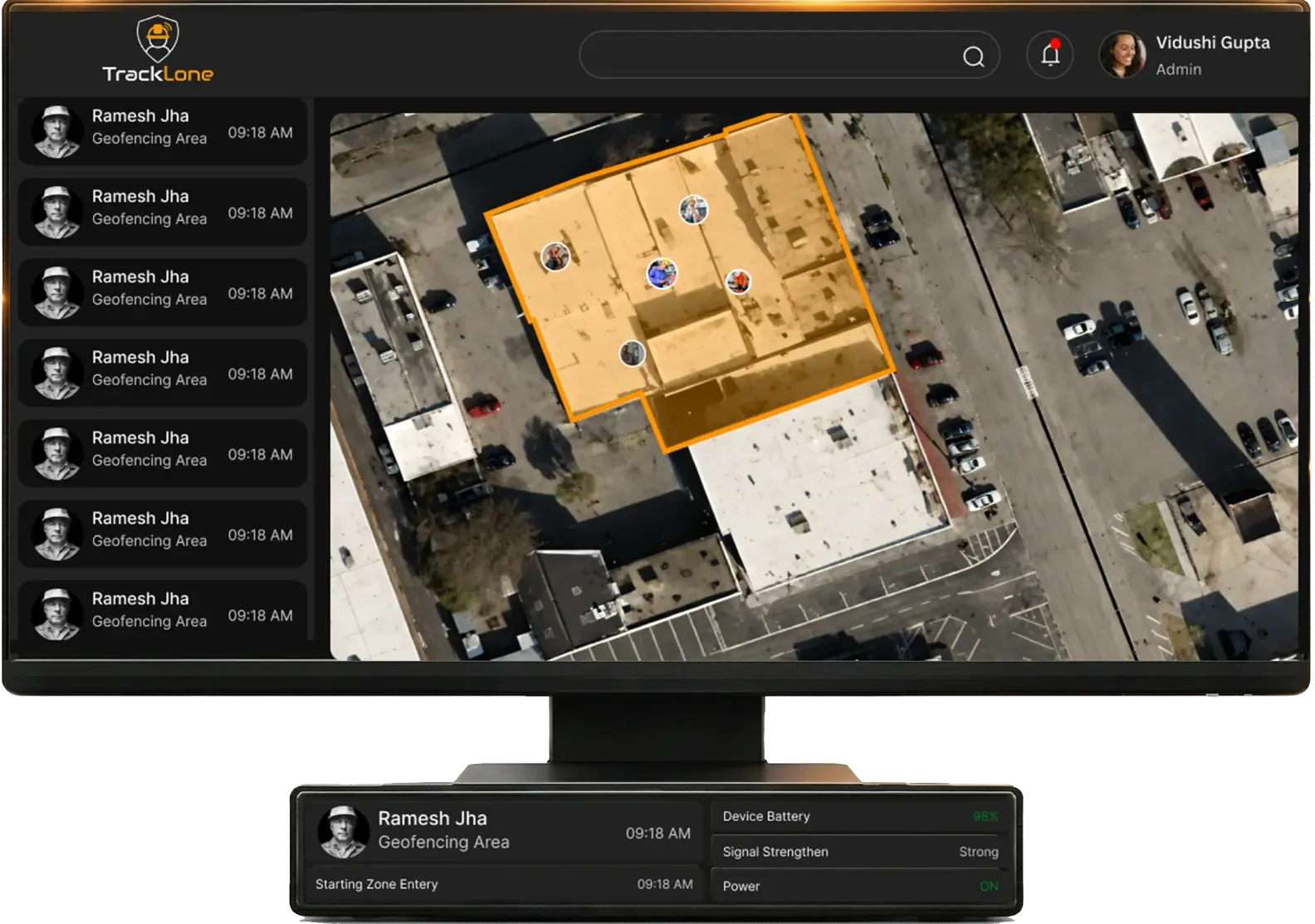
TrackLone WP25 lone worker safety device is a robust industrial device designed to protect individuals operating in high-risk environments. This SaaS solution provides real-time monitoring, automatic alerts, and enhanced visibility to ensure the safety of workers across various demanding industries. It targets EHS teams, safety officers, and plant managers in sectors like Mining & Metals, Manufacturing, FMCG & Warehousing, Construction, and Facility & Security.Key Features:SOS & Fall Detection: Instant alerts triggered by manual SOS or automatic fall detection.Smart Geofencing: Automatic alerts when workers enter or exit defined safe/unsafe zones.Man-Down & No-Motion Alerts: Triggers alerts if a worker becomes inactive beyond a safe threshold.Two-Way Calling: Enables direct communication between supervisors and workers during emergencies.Live GPS Location & Route History: Real-time tracking and 24-hour movement history for enhanced visibility.Smart Check-Ins & Shift Verification: Automated alerts for missed check-ins, ensuring presence and safety.Use Cases:TrackLone WP25 is invaluable in scenarios where workers operate alone in isolated or hazardous conditions, where immediate support and real-time visibility are critical. For instance, in a large manufacturing plant, if a lone worker experiences a fall or medical event, the device automatically triggers an alert, significantly reducing emergency response time and preventing worsening outcomes. In construction sites or remote mining operations, the live GPS tracking and geofencing features ensure that workers do not inadvertently enter restricted or high-risk areas without immediate notification to supervisors.The solution also addresses the challenge of limited real-time visibility for supervisors, replacing manual check-ins with automated alerts for inactivity or missed check-ins. This proactive approach helps EHS teams monitor worker safety in real time, ensuring adherence to safety protocols and supporting daily industrial safety operations. It's built to withstand harsh industrial environments, providing continuous protection without disrupting daily work.Pricing Information:Specific pricing details are not explicitly provided; however, the platform offers options to "Book a Demo" and "Request a Demo," indicating a sales-led approach for potential clients. This suggests a paid subscription model tailored to organizational needs.User Experience and Support:The WP25 device is described as compact, uniform-mounted, and user-friendly, ensuring continuous protection without hindering daily tasks. Testimonials highlight the reliability of the device and the highly supportive team at TrackLone, who are committed to understanding client requirements during the trial period. The system provides real-time alerts and dashboards for supervisors, designed for ease of monitoring and faster response.Technical Details:The WP25 device is rugged and industrial-grade, featuring an IP67 rating, vibration resistance, and long shift readiness, built to perform reliably in demanding environments. It utilizes cellular and GPS technologies for real-time tracking and communication. While functionality depends on network coverage in remote areas, it's designed for stable performance in noise-heavy and high-impact settings.Pros and Cons:Pros:Significantly improves emergency response time.Enhances real-time worker visibility and location tracking.Features automatic fall, man-down, and no-motion detection.Includes smart geofencing for restricted zone management.Rugged, industrial-grade design (IP67, vibration resistant).Supports two-way communication for immediate assistance.Aids EHS teams in improving safety compliance.Cons:Functionality in remote or low-signal areas depends on cellular network coverage.Requires initial setup and definition of geofenced zones.Conclusion:TrackLone WP25 offers a comprehensive and reliable lone worker safety solution, empowering organizations to protect their workforce in high-risk industrial environments. By providing instant alerts, real-time location data, and robust communication tools, it drastically reduces incident response times and enhances overall safety outcomes. Request a demo today to see how TrackLone can safeguard your operations.
MPulse Software is a CMMS (Computerized Maintenance Management System) trusted by 2,700+ organizations worldwide for work order management, preventive maintenance scheduling, asset management, and parts inventory tracking. Unlike cloud-only competitors, MPulse offers both cloud-hosted and on-premise deployment, plus the flexibility of a perpetual license or annual subscription. Our concurrent user licensing model means you pay for simultaneous users, not total headcount, saving mid-size teams 30–50% vs. per-user pricing. With 20+ years of experience serving manufacturing, healthcare, education, and facilities management, MPulse delivers enterprise-grade maintenance management software built to scale.
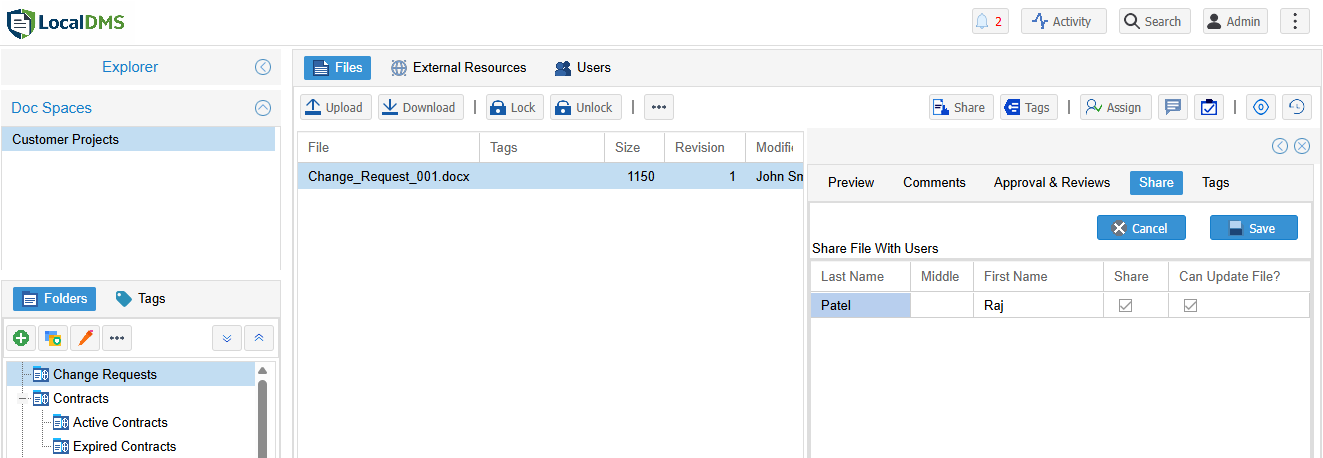
LocalDMS is a robust, browser-based document management system designed to provide enterprise-grade features for teams of all sizes. It ensures secure storage, instant searchability, and comprehensive control over all your digital files, whether deployed on-premises or in a hosted SaaS environment. This solution is ideal for small teams leveraging the free Community Edition, as well as larger organizations prioritizing data privacy, compliance, and cost-effective document management. Key Features Instant full-text search with built-in OCR for scanned PDFs and images, supporting multiple languages. Automatic version tracking and immutable compliance audit trails for every document revision. Granular role permissions, secure collaboration tools, and streamlined external file sharing. Flexible hybrid deployment options, including 100% on-premises on Windows servers for data sovereignty or a fully managed SaaS environment. In-app task assignments and document comments to enhance daily workflows. Free-forever Community Edition for up to 10 users, with no credit card or expiration. Use Cases LocalDMS addresses the critical need for organized, secure, and accessible document workflows. For businesses struggling with scattered files and inefficient processes, it centralizes all documents, making them searchable and manageable from a single screen. This improves productivity by allowing users to browse folders, preview files instantly, and manage tags, approvals, and sharing effortlessly. The platform is particularly beneficial for organizations with strict compliance requirements. Its automatic version tracking, immutable audit trails, and granular permissions ensure that every document change is recorded and controlled, meeting regulatory standards. Furthermore, the option for 100% on-premises deployment provides absolute data privacy and sovereignty, a crucial advantage for industries handling sensitive information. For modern teams, LocalDMS facilitates seamless collaboration, whether in the office or working remotely. Features like in-app task assignments, document comments, and secure external sharing streamline communication and ensure that team members and clients can interact with documents efficiently and securely. Pricing Information LocalDMS offers a compelling pricing model, starting with a "free-forever" Community Edition for up to 10 users, which requires no credit card, has no trial expiration, and no recurring fees. For larger teams, on-premises perpetual licenses are available, starting at $750 for up to 20 users, $3,000 for 50 users, and $5,000 for 100 users. These perpetual licenses mean a one-time purchase with no annual renewal fees, offering significant long-term cost savings compared to typical SaaS subscriptions. Pricing for the hosted SaaS environment is available upon contact. User Experience and Support Designed to be "Affordable. Powerful. Simple.", LocalDMS provides a user-friendly, browser-based interface that works intuitively. The Community Edition boasts a "1-Click Installation" for quick setup on a Windows PC or server. While specific support channels aren't detailed, the platform encourages users to "Contact us" for more questions and assistance with evaluation, implying direct support availability. Technical Details LocalDMS is primarily designed for on-premises deployment on local Windows servers, giving users complete control over their data, security, and infrastructure. It operates as a browser-based application, ensuring accessibility from various devices. A key technical feature is its built-in OCR (Optical Character Recognition) service, which automatically extracts text from scanned PDFs and images, adding it to the full-text search index for enhanced discoverability. Pros and Cons Pros: Generous free-forever Community Edition for small teams. Cost-effective perpetual licenses with no recurring fees for on-premises deployments. Strong emphasis on data privacy and sovereignty with 100% on-premises option. Comprehensive enterprise-grade features including version control, audit trails, and OCR. Flexible hybrid deployment model (on-premises or SaaS). Cons: Primary deployment model is Windows server-based, which might not suit all IT environments. Specific pricing for the hosted SaaS option is not publicly detailed. No explicit mention of dedicated mobile applications, though browser-based access is implied. Conclusion LocalDMS stands out as a powerful and affordable document management solution, offering enterprise-level features like version control, audit trails, and advanced search capabilities without the high recurring costs of many competitors. Its flexible deployment options cater to diverse needs, from small teams seeking a free solution to larger enterprises prioritizing data control. We encourage you to download the free Community Edition or schedule a demo to experience its full potential.

Peptide Nerds is a free, evidence-based peptide weight loss guide covering retatrutide, semaglutide, tirzepatide, and 40+ other compounds. Compare dosing protocols, read real clinical trial data, and find research-backed recommendations for GLP-1 peptides and weight management.
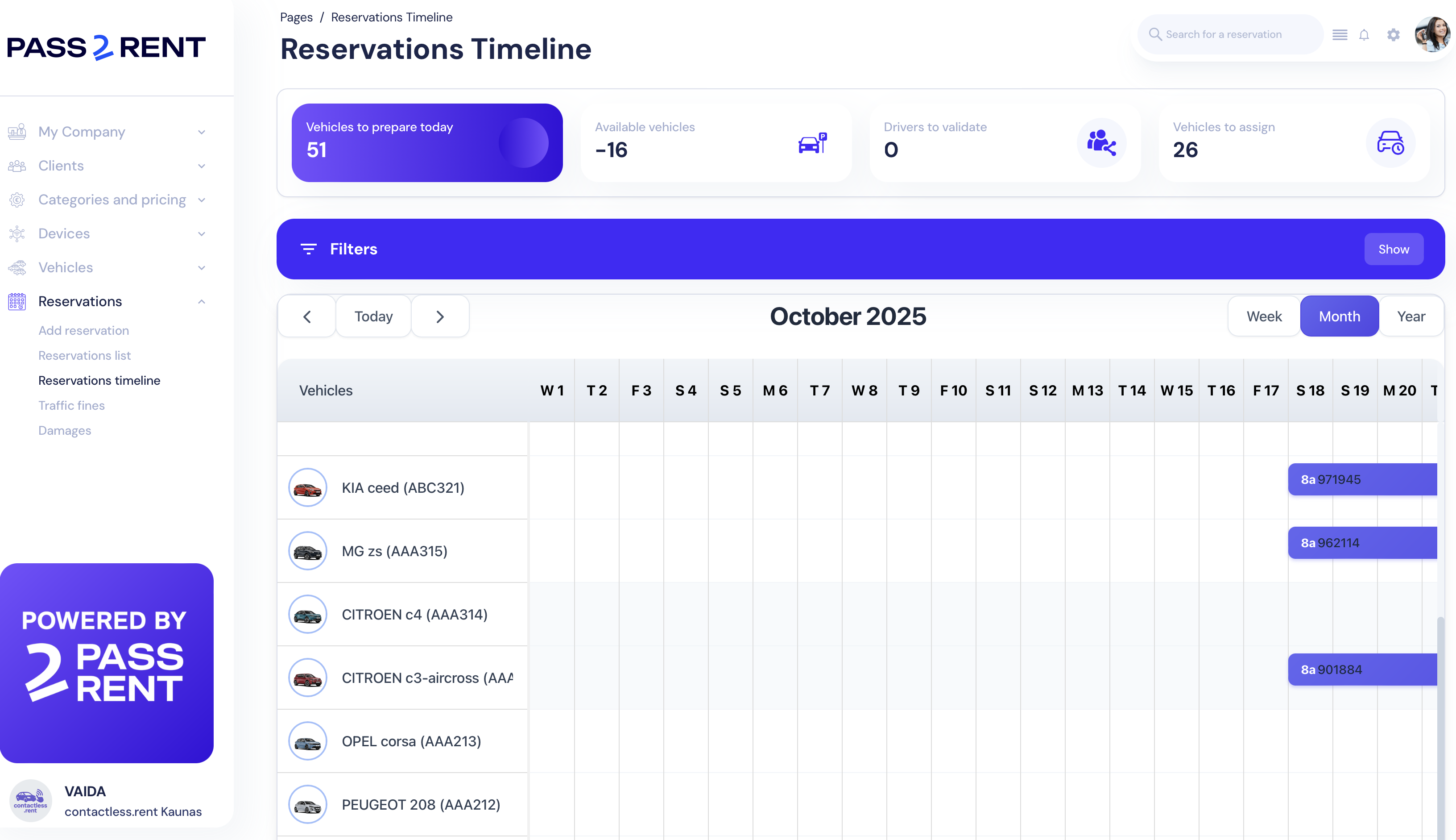
PASS2RENT is an all-in-one car rental management platform that helps rental companies automate operations, manage fleets and pricing in real time, and sell online through a fully branded booking website. Designed for efficiency and scalability, it connects reservations, vehicles, payments, and customer workflows in one seamless system.
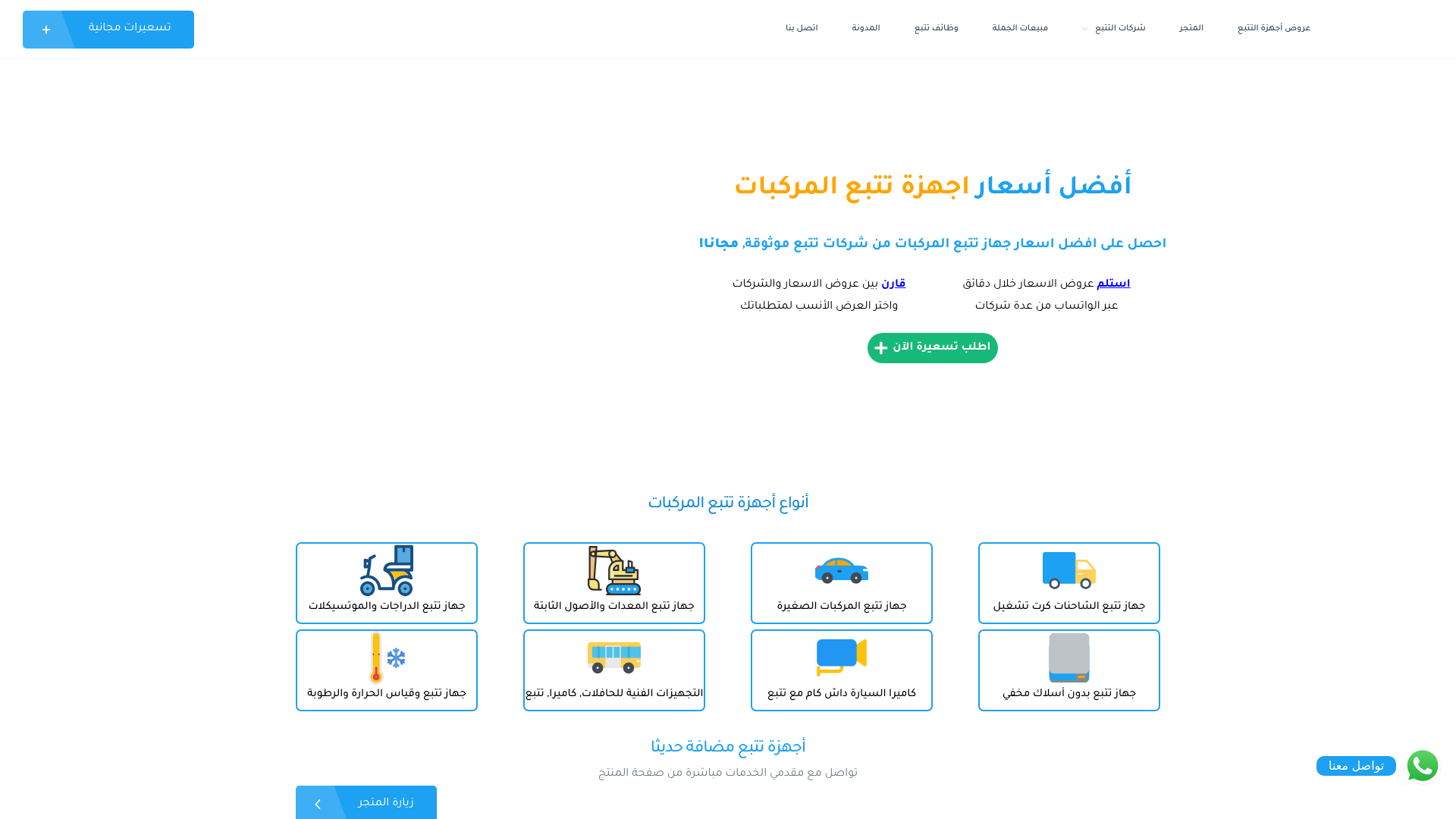
Trakify is a specialized online platform designed to simplify the process of acquiring vehicle tracking devices and services in Saudi Arabia. It acts as a marketplace, connecting individuals and businesses with trusted tracking companies to obtain free, competitive quotes for various GPS tracking solutions. The platform primarily targets fleet managers, logistics companies, asset owners, and individuals seeking to enhance the security and management of their vehicles, equipment, and valuable assets. Key Features Free and quick quotes from multiple certified tracking companies, delivered via WhatsApp. A diverse range of tracking devices, including solutions for trucks, small vehicles, heavy equipment, motorcycles, hidden trackers, dash cams, and temperature/humidity monitoring. Ability to compare offers from different providers to select the most suitable solution. Direct communication channels with service providers for inquiries and support. An informative blog offering guides on device activation, maintenance, and troubleshooting (e.g., IMEI changes, subscription renewals). Options for wholesale purchases and career opportunities within the tracking industry. Use Cases Trakify is invaluable for businesses engaged in logistics and transportation. Fleet managers can leverage the platform to find robust GPS tracking systems for their trucks and delivery vehicles, ensuring efficient route planning, driver monitoring, and compliance with local transport regulations, such as integration with the "Wasl" platform. This helps in optimizing operational costs and improving overall fleet efficiency. Beyond traditional vehicles, Trakify caters to specialized needs like asset security and environmental monitoring. Companies can secure valuable construction equipment, fixed assets, or even motorcycles with advanced tracking devices. Furthermore, industries requiring precise environmental control, such as food and pharmaceutical transport, can find solutions for real-time temperature and humidity monitoring to meet regulatory standards set by authorities like the Food and Drug General Authority. Pricing Information Trakify offers its core service of obtaining quotes completely free of charge. Users can request and receive multiple price offers from various tracking companies without any upfront cost, allowing for transparent comparison before making a purchasing decision for the tracking devices and services themselves. User Experience and Support The platform is designed for ease of use, featuring a clear navigation structure that allows users to quickly request quotes, browse the store, or access the blog. The process of requesting quotes and receiving them via WhatsApp is streamlined for convenience. For direct assistance, Trakify provides dedicated customer support via phone (+966570960313) and email (info@trkify.com), complemented by a comprehensive blog with self-help articles and tutorials. Technical Details Trakify operates as a web-based platform, serving as a digital marketplace that facilitates the procurement of IoT and GPS tracking solutions. While specific programming languages or frameworks for the platform itself are not detailed, it effectively integrates with various tracking device providers and leverages communication channels like WhatsApp to deliver its services efficiently. Pros and Cons Pros: Access to free, comparative quotes from multiple trusted providers. Extensive selection of tracking devices for diverse applications. Simplifies the decision-making process for tracking solutions. Direct engagement with service providers. Valuable educational content through its blog. Supports compliance with local regulations (e.g., Wasl, food authority). Cons: The platform itself does not list device prices directly, requiring a quote request. Reliance on third-party companies for device installation and ongoing service quality. Limited explicit technical details about the platform's backend. Primarily focused on the Saudi Arabian market and presented in Arabic. Conclusion Trakify stands out as an essential resource for anyone in Saudi Arabia looking for reliable and cost-effective vehicle and asset tracking solutions. By offering a streamlined process for obtaining and comparing free quotes from multiple providers, it empowers users to make informed choices, ensuring enhanced security, efficiency, and compliance. Explore Trakify today to find the perfect tracking solution for your needs.
LocalDMS is a robust, browser-based document management system designed to provide enterprise-grade features for teams of all sizes. It ensures secure storage, instant searchability, and comprehensive control over all your digital files, whether deployed on-premises or in a hosted SaaS environment. This solution is ideal for small teams leveraging the free Community Edition, as well as larger organizations prioritizing data privacy, compliance, and cost-effective document management. Key Features Instant full-text search with built-in OCR for scanned PDFs and images, supporting multiple languages. Automatic version tracking and immutable compliance audit trails for every document revision. Granular role permissions, secure collaboration tools, and streamlined external file sharing. Flexible hybrid deployment options, including 100% on-premises on Windows servers for data sovereignty or a fully managed SaaS environment. In-app task assignments and document comments to enhance daily workflows. Free-forever Community Edition for up to 10 users, with no credit card or expiration. Use Cases LocalDMS addresses the critical need for organized, secure, and accessible document workflows. For businesses struggling with scattered files and inefficient processes, it centralizes all documents, making them searchable and manageable from a single screen. This improves productivity by allowing users to browse folders, preview files instantly, and manage tags, approvals, and sharing effortlessly. The platform is particularly beneficial for organizations with strict compliance requirements. Its automatic version tracking, immutable audit trails, and granular permissions ensure that every document change is recorded and controlled, meeting regulatory standards. Furthermore, the option for 100% on-premises deployment provides absolute data privacy and sovereignty, a crucial advantage for industries handling sensitive information. For modern teams, LocalDMS facilitates seamless collaboration, whether in the office or working remotely. Features like in-app task assignments, document comments, and secure external sharing streamline communication and ensure that team members and clients can interact with documents efficiently and securely. Pricing Information LocalDMS offers a compelling pricing model, starting with a "free-forever" Community Edition for up to 10 users, which requires no credit card, has no trial expiration, and no recurring fees. For larger teams, on-premises perpetual licenses are available, starting at $750 for up to 20 users, $3,000 for 50 users, and $5,000 for 100 users. These perpetual licenses mean a one-time purchase with no annual renewal fees, offering significant long-term cost savings compared to typical SaaS subscriptions. Pricing for the hosted SaaS environment is available upon contact. User Experience and Support Designed to be "Affordable. Powerful. Simple.", LocalDMS provides a user-friendly, browser-based interface that works intuitively. The Community Edition boasts a "1-Click Installation" for quick setup on a Windows PC or server. While specific support channels aren't detailed, the platform encourages users to "Contact us" for more questions and assistance with evaluation, implying direct support availability. Technical Details LocalDMS is primarily designed for on-premises deployment on local Windows servers, giving users complete control over their data, security, and infrastructure. It operates as a browser-based application, ensuring accessibility from various devices. A key technical feature is its built-in OCR (Optical Character Recognition) service, which automatically extracts text from scanned PDFs and images, adding it to the full-text search index for enhanced discoverability. Pros and Cons Pros: Generous free-forever Community Edition for small teams. Cost-effective perpetual licenses with no recurring fees for on-premises deployments. Strong emphasis on data privacy and sovereignty with 100% on-premises option. Comprehensive enterprise-grade features including version control, audit trails, and OCR. Flexible hybrid deployment model (on-premises or SaaS). Cons: Primary deployment model is Windows server-based, which might not suit all IT environments. Specific pricing for the hosted SaaS option is not publicly detailed. No explicit mention of dedicated mobile applications, though browser-based access is implied. Conclusion LocalDMS stands out as a powerful and affordable document management solution, offering enterprise-level features like version control, audit trails, and advanced search capabilities without the high recurring costs of many competitors. Its flexible deployment options cater to diverse needs, from small teams seeking a free solution to larger enterprises prioritizing data control. We encourage you to download the free Community Edition or schedule a demo to experience its full potential.
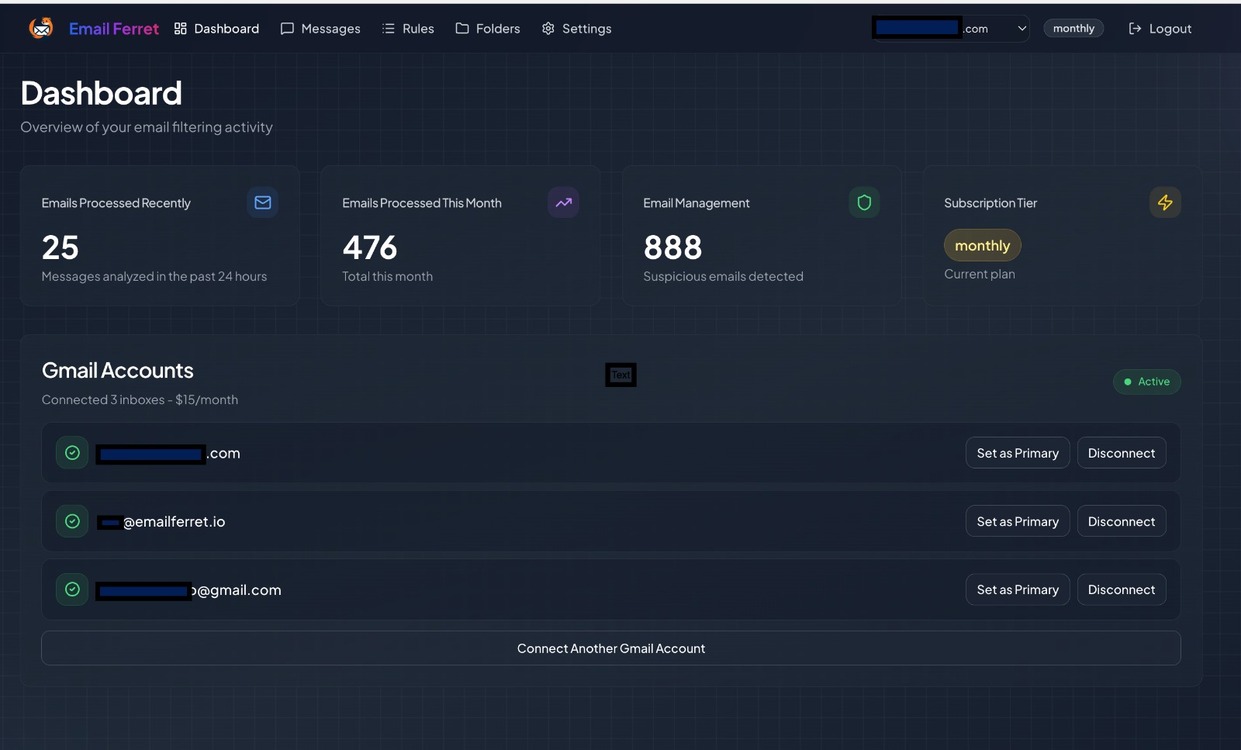
AI personal assistant for Gmail.

Foundigy is a global startup directory, helping founders across every industry gain visibility, showcase their businesses, and connect with the right audience. Whether you’re building SaaS, e-commerce, or any kind of startup, Foundigy makes sure your brand gets discovered and grows.

Download Pinterest videos instantly in MP4 format. Free Pinterest video downloader with no registration required. Save Pinterest videos, images, and GIFs to your device easily and securely.
LocalDMS is a robust, browser-based document management system designed to provide enterprise-grade features for teams of all sizes. It ensures secure storage, instant searchability, and comprehensive control over all your digital files, whether deployed on-premises or in a hosted SaaS environment. This solution is ideal for small teams leveraging the free Community Edition, as well as larger organizations prioritizing data privacy, compliance, and cost-effective document management. Key Features Instant full-text search with built-in OCR for scanned PDFs and images, supporting multiple languages. Automatic version tracking and immutable compliance audit trails for every document revision. Granular role permissions, secure collaboration tools, and streamlined external file sharing. Flexible hybrid deployment options, including 100% on-premises on Windows servers for data sovereignty or a fully managed SaaS environment. In-app task assignments and document comments to enhance daily workflows. Free-forever Community Edition for up to 10 users, with no credit card or expiration. Use Cases LocalDMS addresses the critical need for organized, secure, and accessible document workflows. For businesses struggling with scattered files and inefficient processes, it centralizes all documents, making them searchable and manageable from a single screen. This improves productivity by allowing users to browse folders, preview files instantly, and manage tags, approvals, and sharing effortlessly. The platform is particularly beneficial for organizations with strict compliance requirements. Its automatic version tracking, immutable audit trails, and granular permissions ensure that every document change is recorded and controlled, meeting regulatory standards. Furthermore, the option for 100% on-premises deployment provides absolute data privacy and sovereignty, a crucial advantage for industries handling sensitive information. For modern teams, LocalDMS facilitates seamless collaboration, whether in the office or working remotely. Features like in-app task assignments, document comments, and secure external sharing streamline communication and ensure that team members and clients can interact with documents efficiently and securely. Pricing Information LocalDMS offers a compelling pricing model, starting with a "free-forever" Community Edition for up to 10 users, which requires no credit card, has no trial expiration, and no recurring fees. For larger teams, on-premises perpetual licenses are available, starting at $750 for up to 20 users, $3,000 for 50 users, and $5,000 for 100 users. These perpetual licenses mean a one-time purchase with no annual renewal fees, offering significant long-term cost savings compared to typical SaaS subscriptions. Pricing for the hosted SaaS environment is available upon contact. User Experience and Support Designed to be "Affordable. Powerful. Simple.", LocalDMS provides a user-friendly, browser-based interface that works intuitively. The Community Edition boasts a "1-Click Installation" for quick setup on a Windows PC or server. While specific support channels aren't detailed, the platform encourages users to "Contact us" for more questions and assistance with evaluation, implying direct support availability. Technical Details LocalDMS is primarily designed for on-premises deployment on local Windows servers, giving users complete control over their data, security, and infrastructure. It operates as a browser-based application, ensuring accessibility from various devices. A key technical feature is its built-in OCR (Optical Character Recognition) service, which automatically extracts text from scanned PDFs and images, adding it to the full-text search index for enhanced discoverability. Pros and Cons Pros: Generous free-forever Community Edition for small teams. Cost-effective perpetual licenses with no recurring fees for on-premises deployments. Strong emphasis on data privacy and sovereignty with 100% on-premises option. Comprehensive enterprise-grade features including version control, audit trails, and OCR. Flexible hybrid deployment model (on-premises or SaaS). Cons: Primary deployment model is Windows server-based, which might not suit all IT environments. Specific pricing for the hosted SaaS option is not publicly detailed. No explicit mention of dedicated mobile applications, though browser-based access is implied. Conclusion LocalDMS stands out as a powerful and affordable document management solution, offering enterprise-level features like version control, audit trails, and advanced search capabilities without the high recurring costs of many competitors. Its flexible deployment options cater to diverse needs, from small teams seeking a free solution to larger enterprises prioritizing data control. We encourage you to download the free Community Edition or schedule a demo to experience its full potential.